
MCP connector
Your farm inside ChatGPT and Claude.
Ask "how much did it rain on field 12 this month?" in the assistant you already use and get the answer from your operation's data — no portal, no report to build.
What to ask
Ask about your farm in your own words.
The same data UPí answers on WhatsApp, in the assistant you already use — on your computer or your phone.
Production
"How is the cotton harvest going this season, by sector?"
Rainfall
"How much did it rain on each field in the last 30 days?"
Pests
"Which pests were above the action threshold in the last scouting report?"
Work orders
"Which field work orders are still open, and what's the area of each one?"
Inventory
"Which crop protection products are below minimum stock?"
Fleet
"What was the tractors' average fuel consumption last month?"
Post-harvest
"How many bales were harvested this season, and what's the average yield?"
Costs
"What's the cost per hectare of each field this season?"
More than one farm
The assistant answers for your current farm. To ask about another one, just name it: "and at Santa Rita Farm?"
Not just questions
The assistant records too.
What your team already sends to UPí on WhatsApp can also be logged from inside Claude and ChatGPT, with the same checks as always.
Today's rainfall
The rain gauge reading goes into the chat and becomes a record for the field.
Fueling
Machine, hour meter and liters, without waiting for the spreadsheet to come back from the field.
Work order
Open the order and log the work done, with the rate checked against the product label.
Incoming invoice
The input that just arrived goes into inventory right away.
One platform
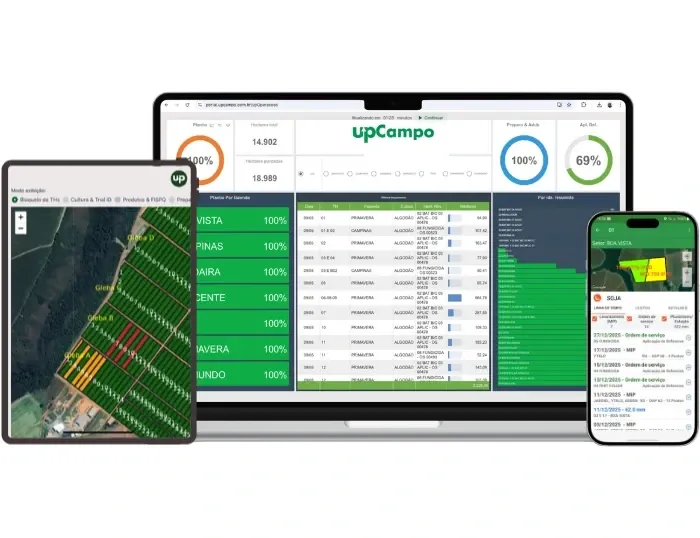
The connector is part of upCampo.
The connector is not a separate product: it reads from and writes to the same platform your team already uses — the same work order, the same inventory, the same cost.
- On the computer: the portal, with more than 100 ready-made reports and dashboards
- In the field: the app, which works with no signal and syncs later
- In the chat: UPí on WhatsApp and the connector in ChatGPT and Claude
Who's using it
Everyone sets up the farm their own way.

We do a lot inside the system, and now we build the views ourselves, our own way. Want to see only the contracts? I ask and it builds it. I linked each machine: I click on it, see where the money went and then open the invoice. It's going to make things so much easier.
Carlos KochemborgesSapezal – MT
How it works
One URL, both assistants.
The connector uses MCP, the open standard Claude and ChatGPT use to connect to external systems. That's why the same URL works for both.
In Claude
Settings → Connectors → Add custom connector → enter the URL → sign in with your upCampo account. Start a new chat and ask away.
In ChatGPT
The connector shows up as a plugin on Business, Enterprise and Edu plans, in the browser: Plugins → Developer mode → Create → OAuth authentication → your upCampo account.
Your account, your access
You sign in with the same login as the portal. The assistant sees only the farms and topics your user can already see — not one more.
Security
Your password never goes to the assistant.
Sign-in on upCampo's own screen
You type your password on an upCampo screen. The assistant only receives an authorization, which you can revoke anytime.
Nothing is stored in the connector
Each question pulls the data on the spot, and the answer goes to the assistant. What stays in the chat follows the rules of Claude or ChatGPT and of your account with them.
Permissions by farm
The administrator grants access topic by topic, farm by farm, in the portal's access control.
Frequently asked questions
Do I need to sign up for anything to use it?
Yes. UPí comes with upCampo's full platform, up.360, priced per hectare on an annual contract. You'll also need an account with the AI assistant you plan to use (Claude or ChatGPT), billed by that service.
What farm data can the AI assistant see?
Only data from the farms your user already has access to in upCampo, and only the topics enabled for you in access control: production, rainfall, pests, work orders, inventory, fleet, post-harvest and costs. Each query runs on the spot, at your request.
Which farm does the assistant answer for when I have more than one?
Your current farm. If none is set as current, the assistant asks which farm you want data from. You can also name the farm in your question.
I got "access not yet granted." What should I do?
It means the sign-in worked, but your user doesn't yet have topic query permission on any farm. Ask your company's administrator to check, in the upCampo portal's access control, the permissions that start with "Consulta do tema" (topic query).
How do I disconnect the connector from the AI assistant?
In the AI app itself, on the connectors screen, by removing the connection.
1 free month
Want your farm answering in the assistant you already use?
One free month on the whole farm, with no contract to sign. The month starts at onboarding. Leave your name, WhatsApp, email and area: we'll reach out to set up the farm with you.