
Pest scouting (IPM)
From beat sheet to report.
Scouts log on their phones, even with no signal. The agronomist gets a map and a report the same day and decides based on the farm's own action thresholds.
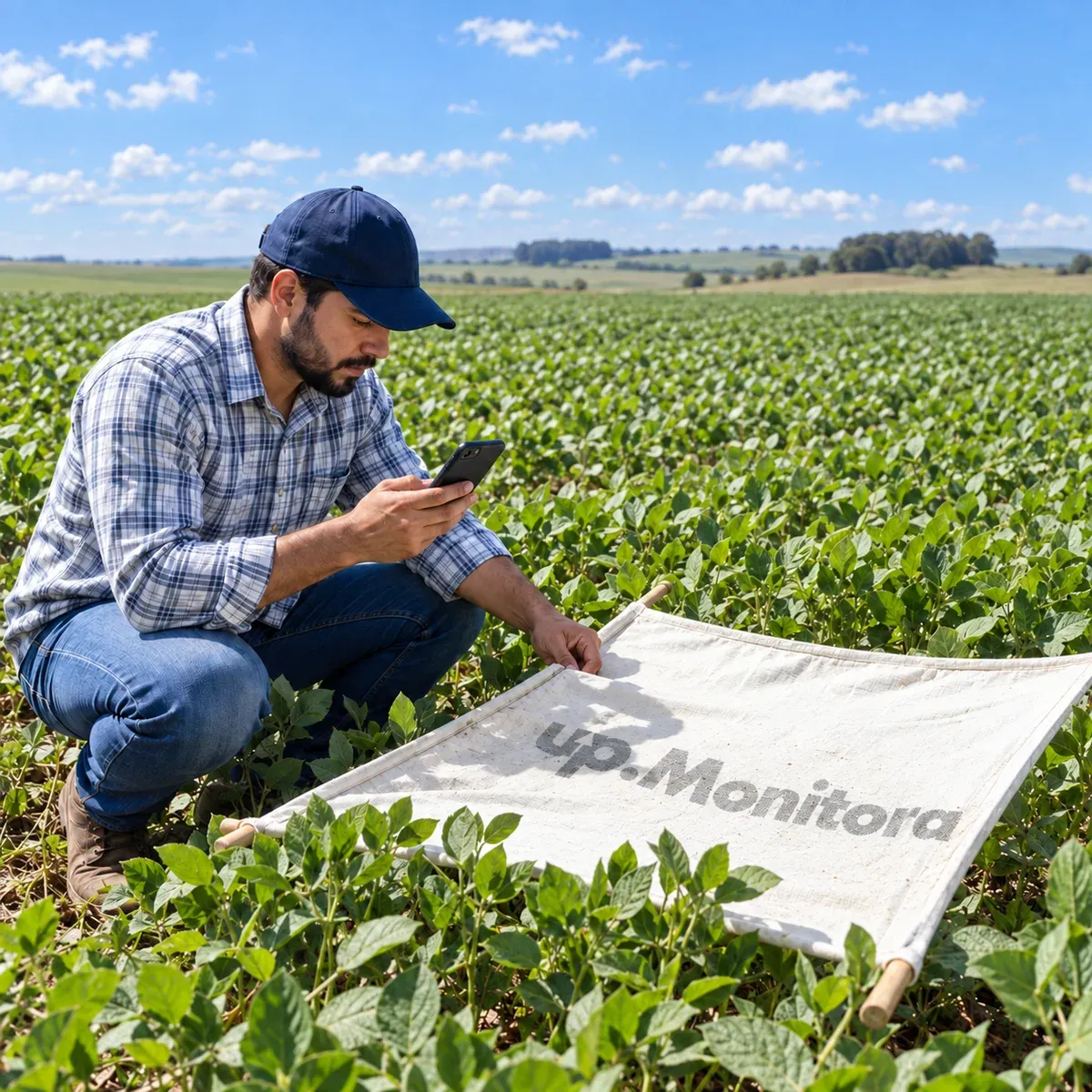
Real-world scouting
IPM already running in the field.
- 64,000+
- pest scouting reports logged
- 17,000
- scouting reports in a single cotton group
- 500+
- app releases since 2014
Field app
It all starts in the app.
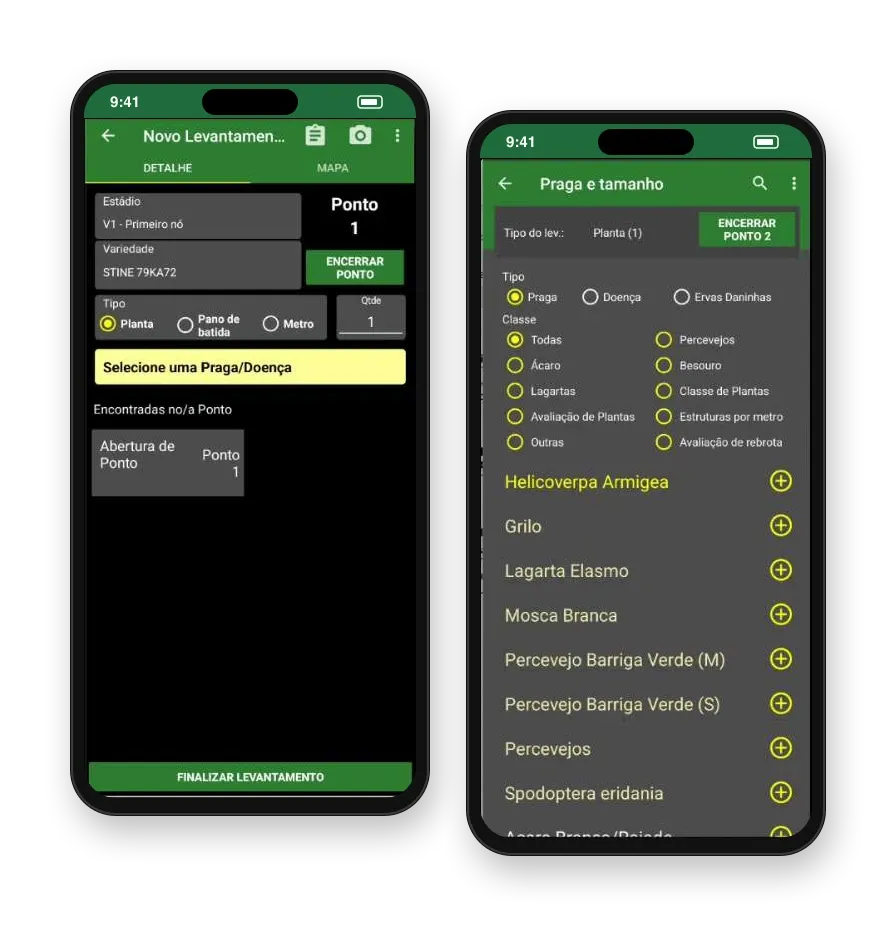
The scout picks the field, opens a point, and counts: per plant, beat sheet, or per meter. GPS, photo, and crop stage are saved with it, and the field summary shows an arrow for whether each pest went up or down since the last scouting.
- Works offline and syncs when the signal returns
- Pests, diseases, and weeds in the same scouting report
- Where a pest has preset levels, the scout just taps low, medium, or high
- Field map in the app, with the scout's position
Reports
Scouting becomes a ready report.
Maps, charts, and tables come straight from what the scout logged, with no re-typing, and reach decision-makers automatically, daily or weekly. Does your farm have its own format? We build the layout, with your logo.
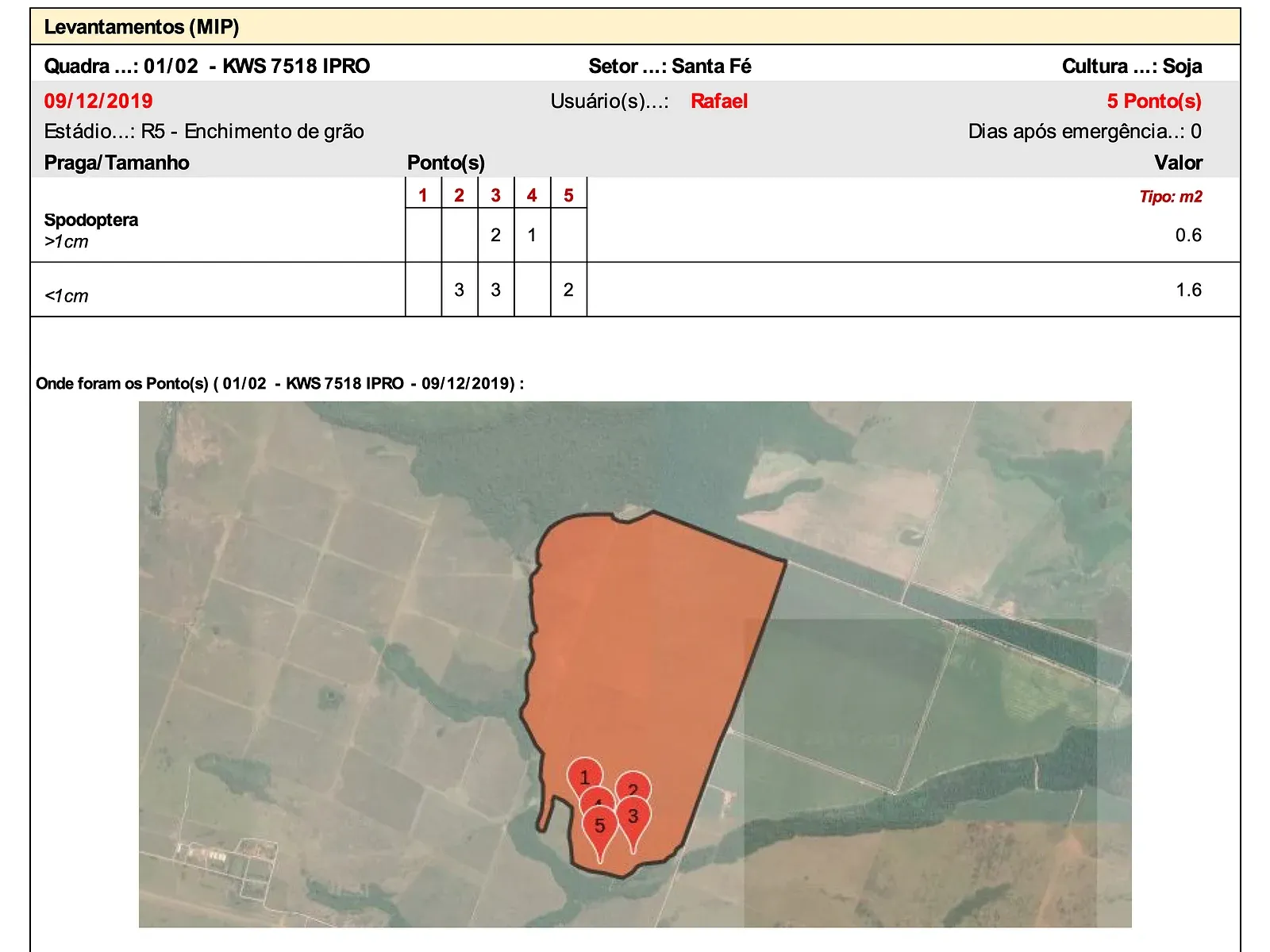
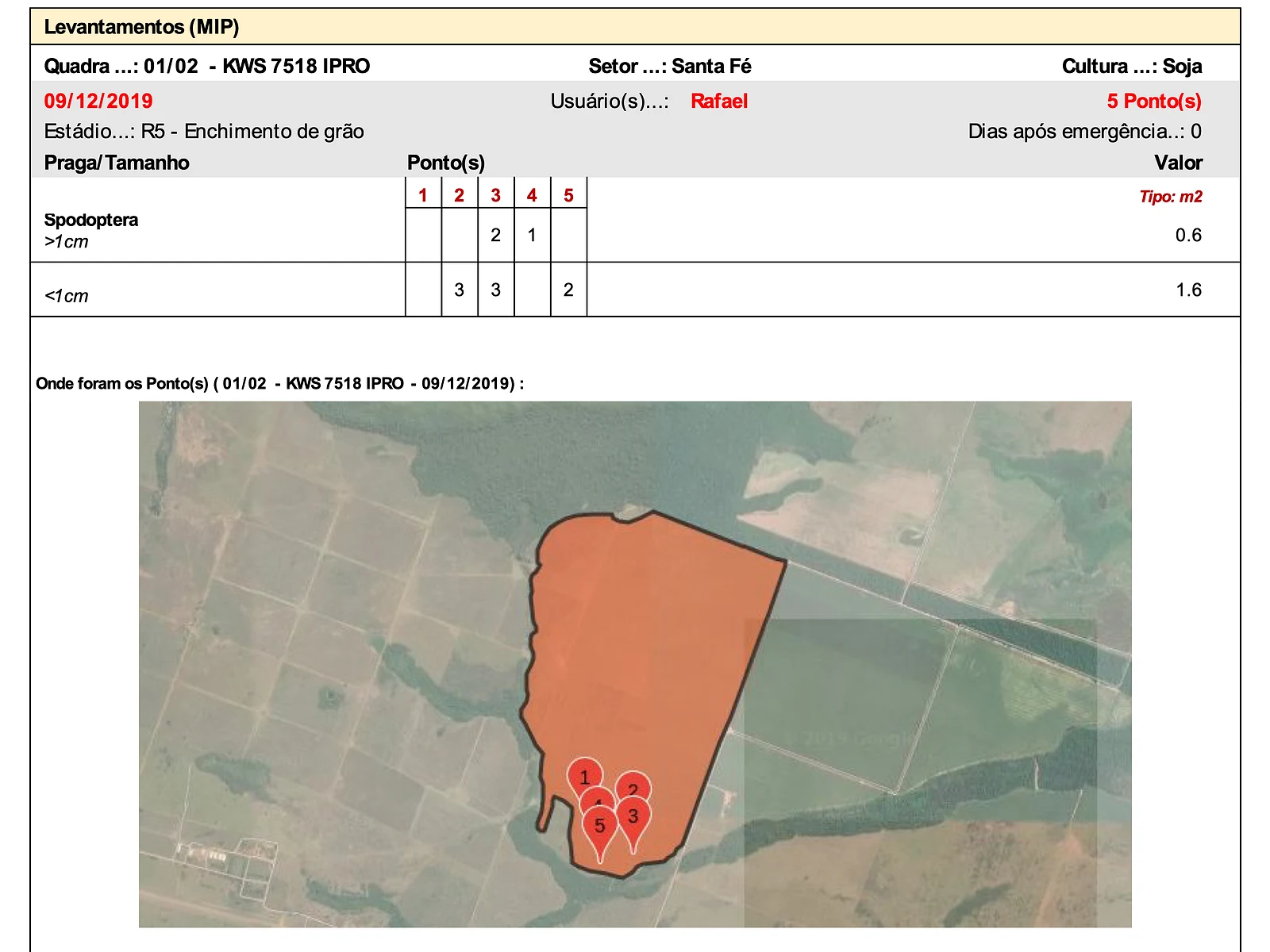
Daily report with map
The count at each point, field by field, plus a map of where the points were taken.
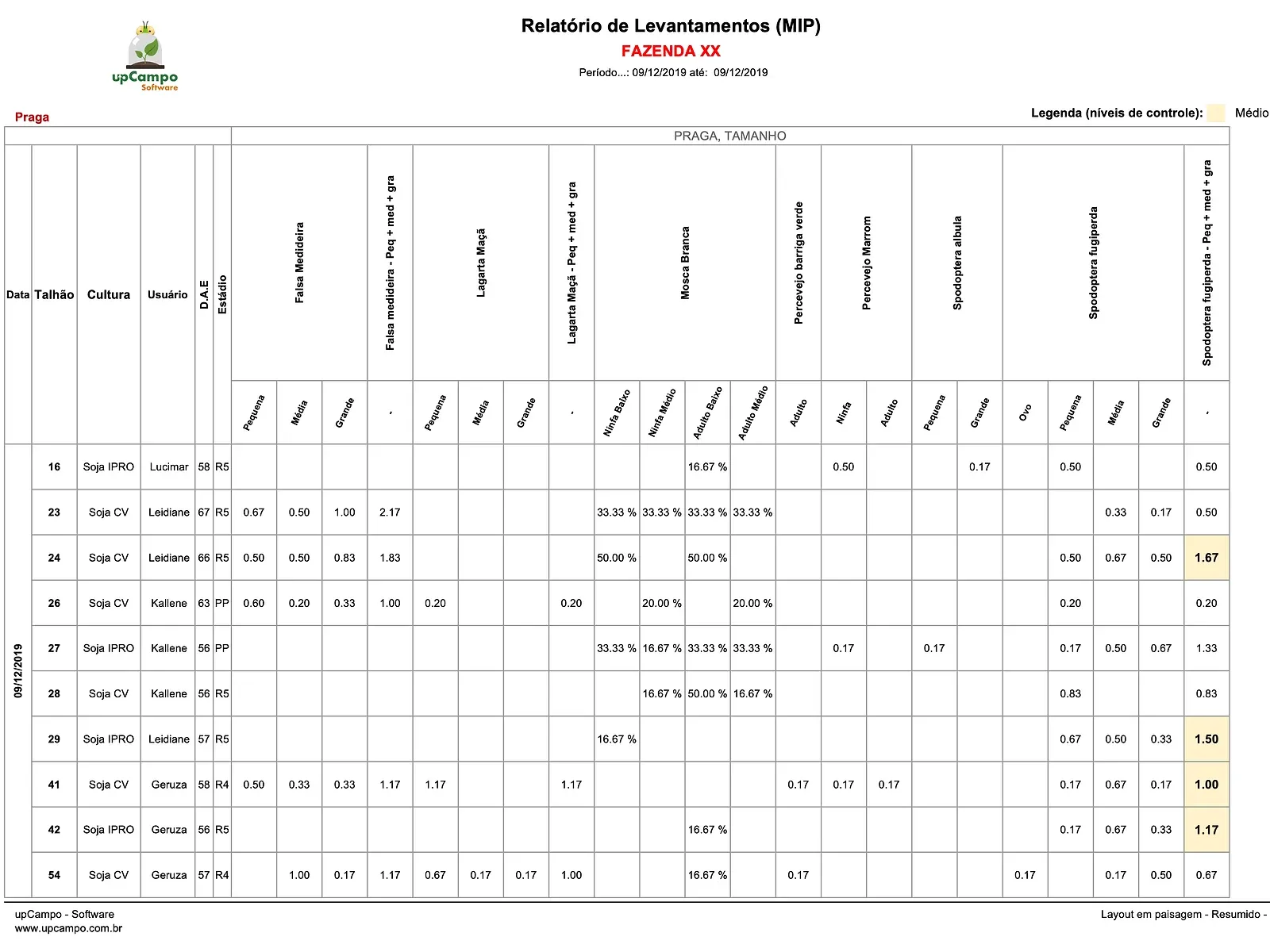
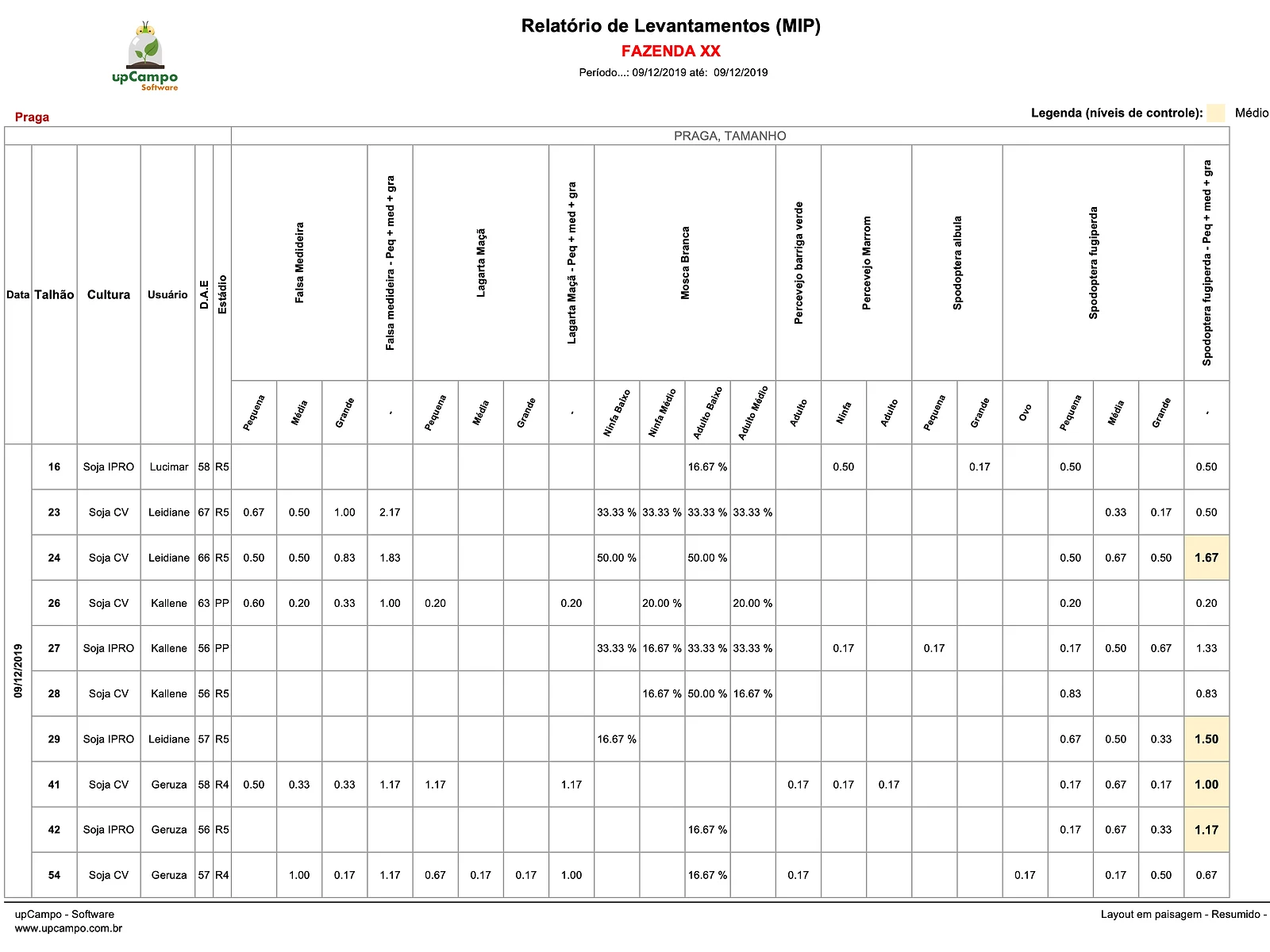
Daily summary
Every pest across every field in one table, color-coded by action threshold.
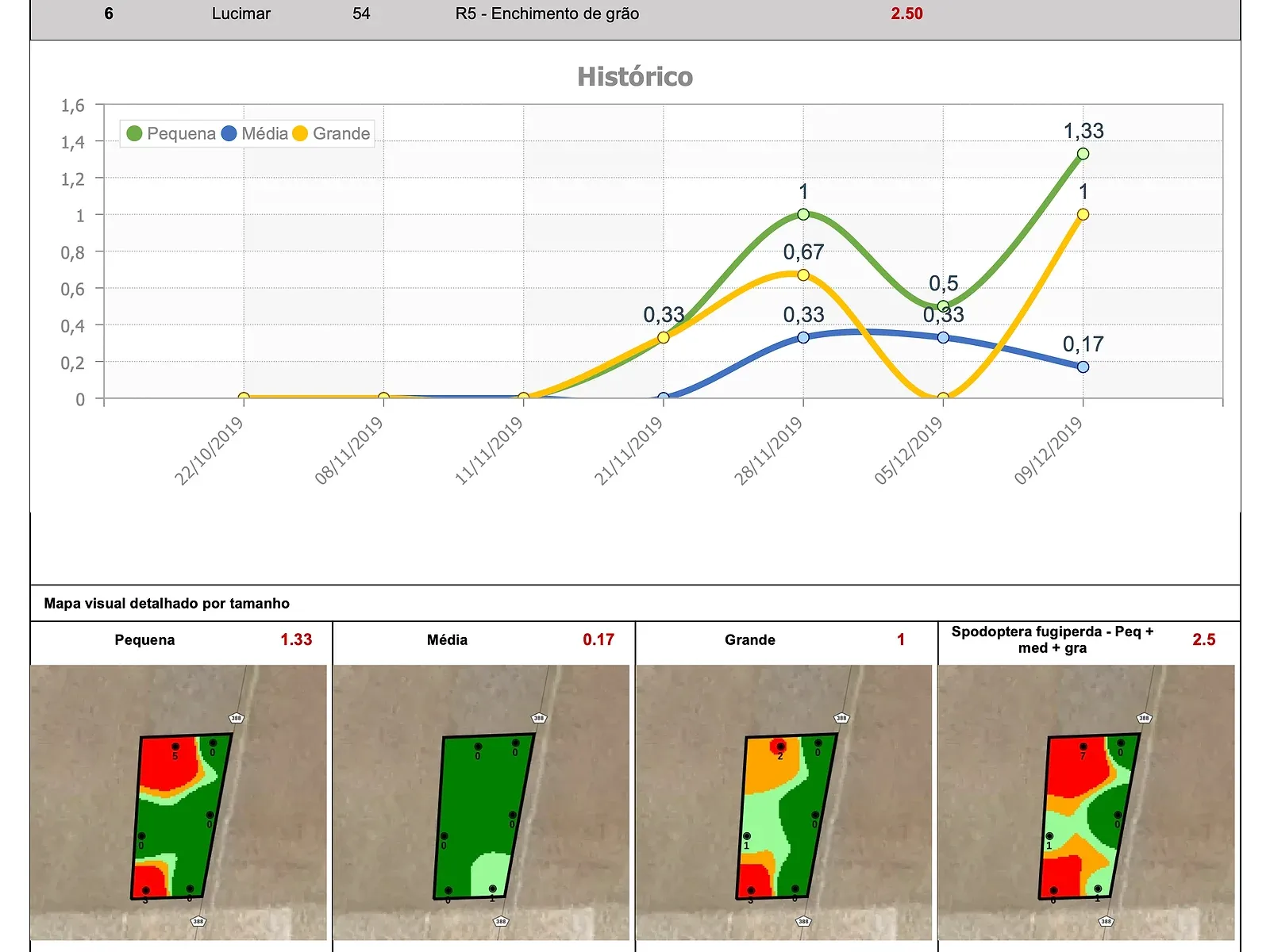
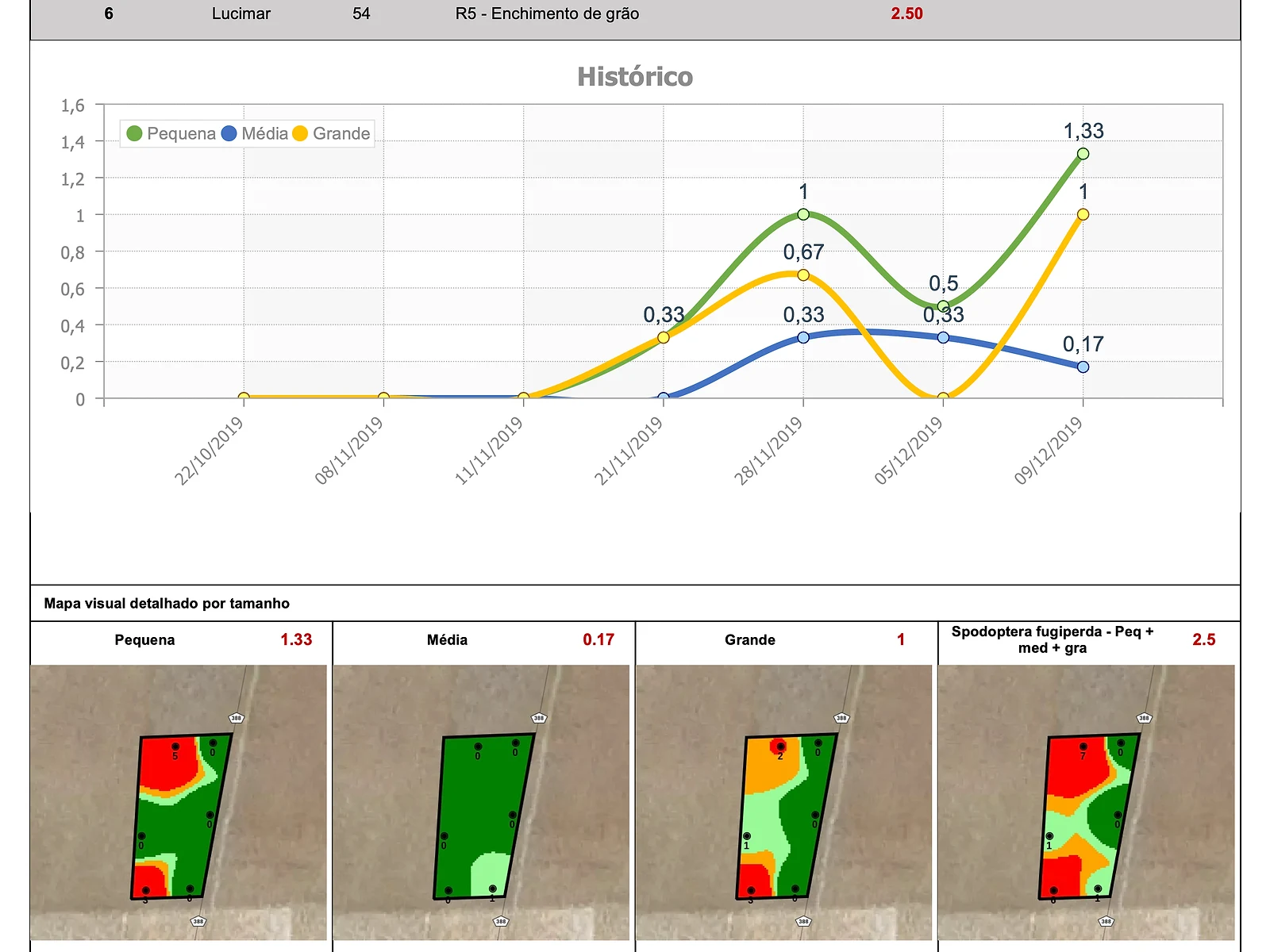
Above the action threshold
Only what crossed the limit, with the pest's history and a map by size.
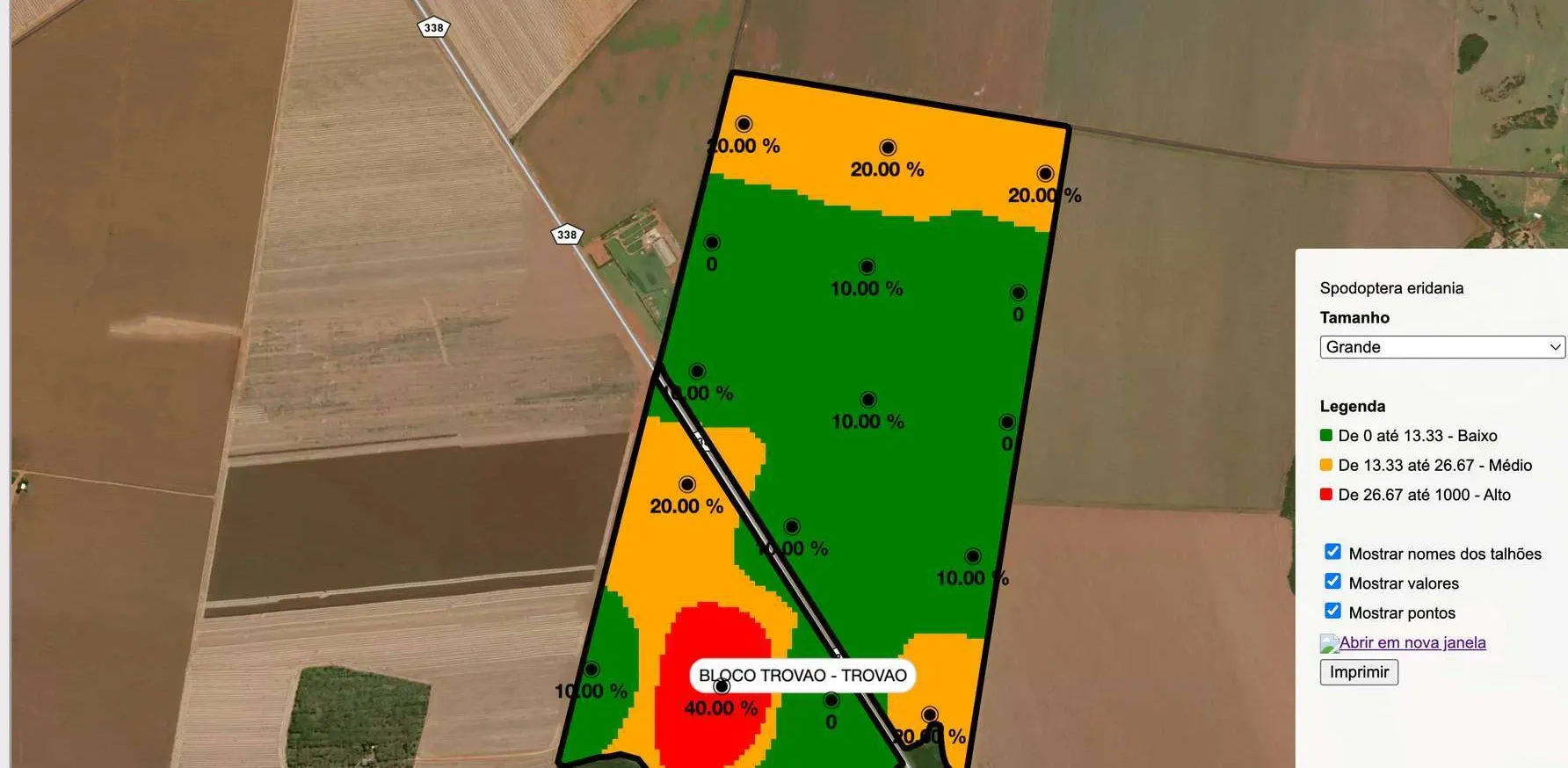
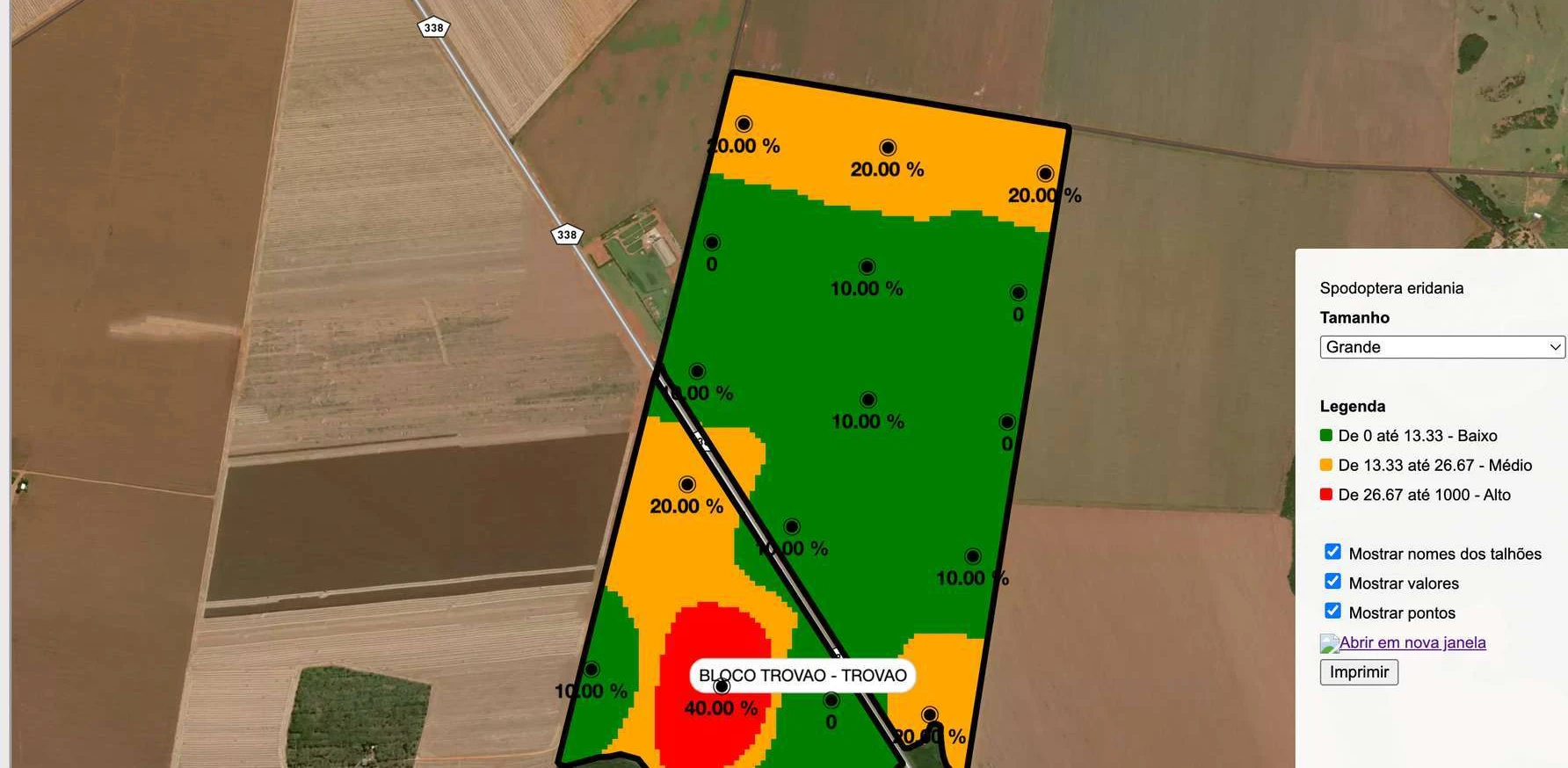
Heat map
Where the pest is concentrated in the field, based on the ranges your farm set.
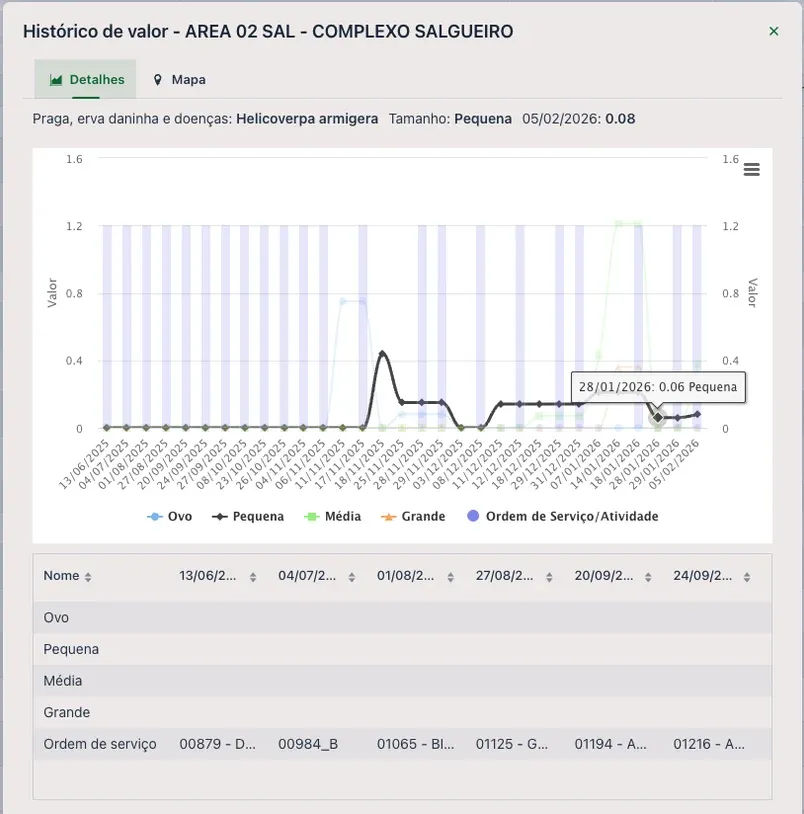
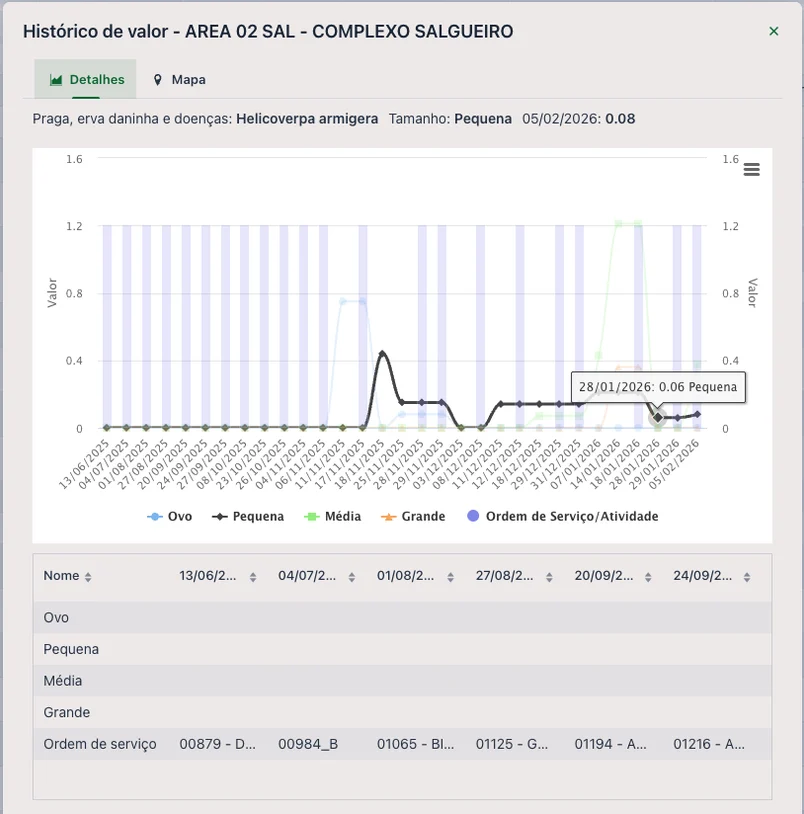
Trend with applications
The pest curve by instar, with work orders on the same timeline.
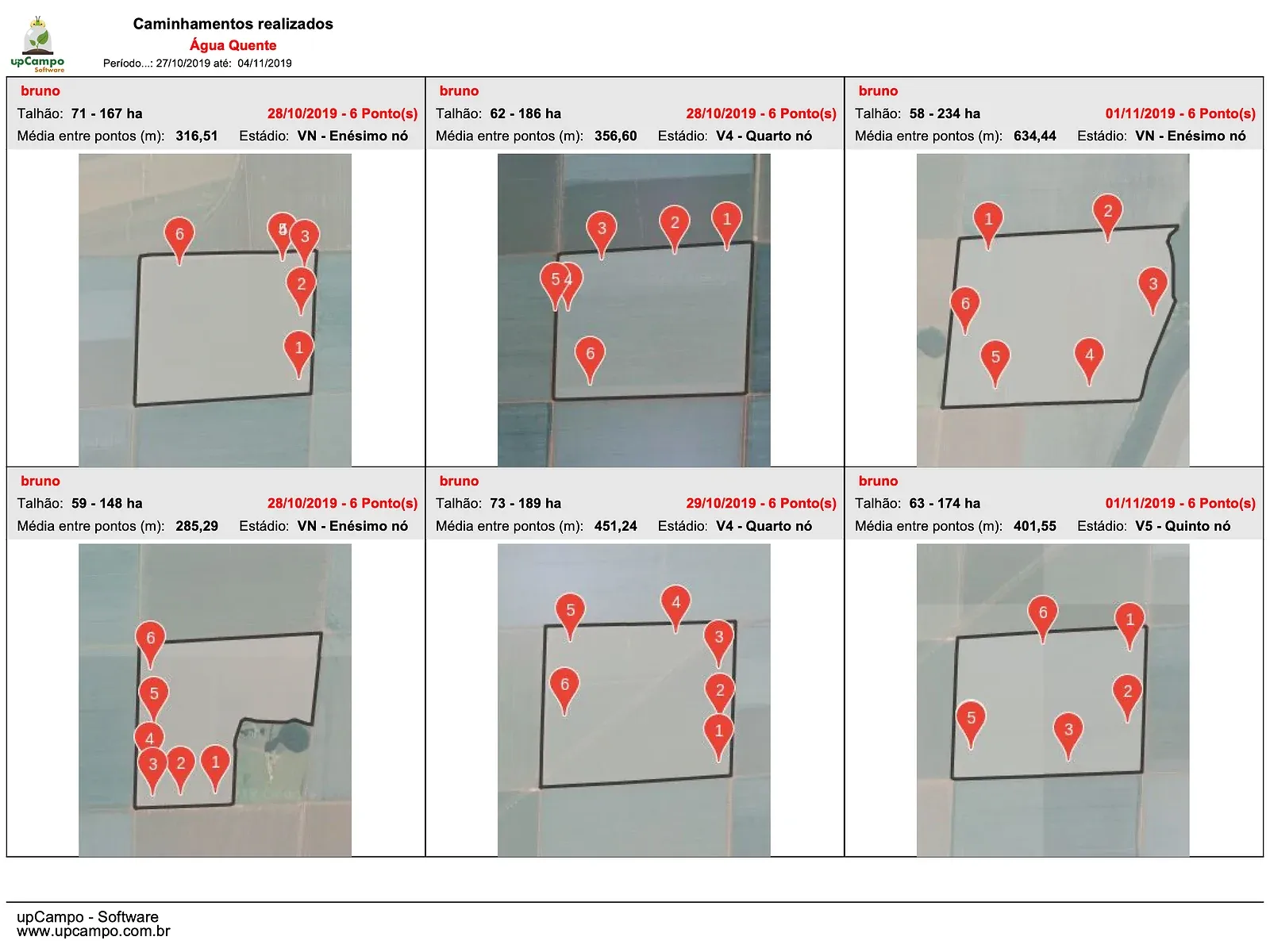
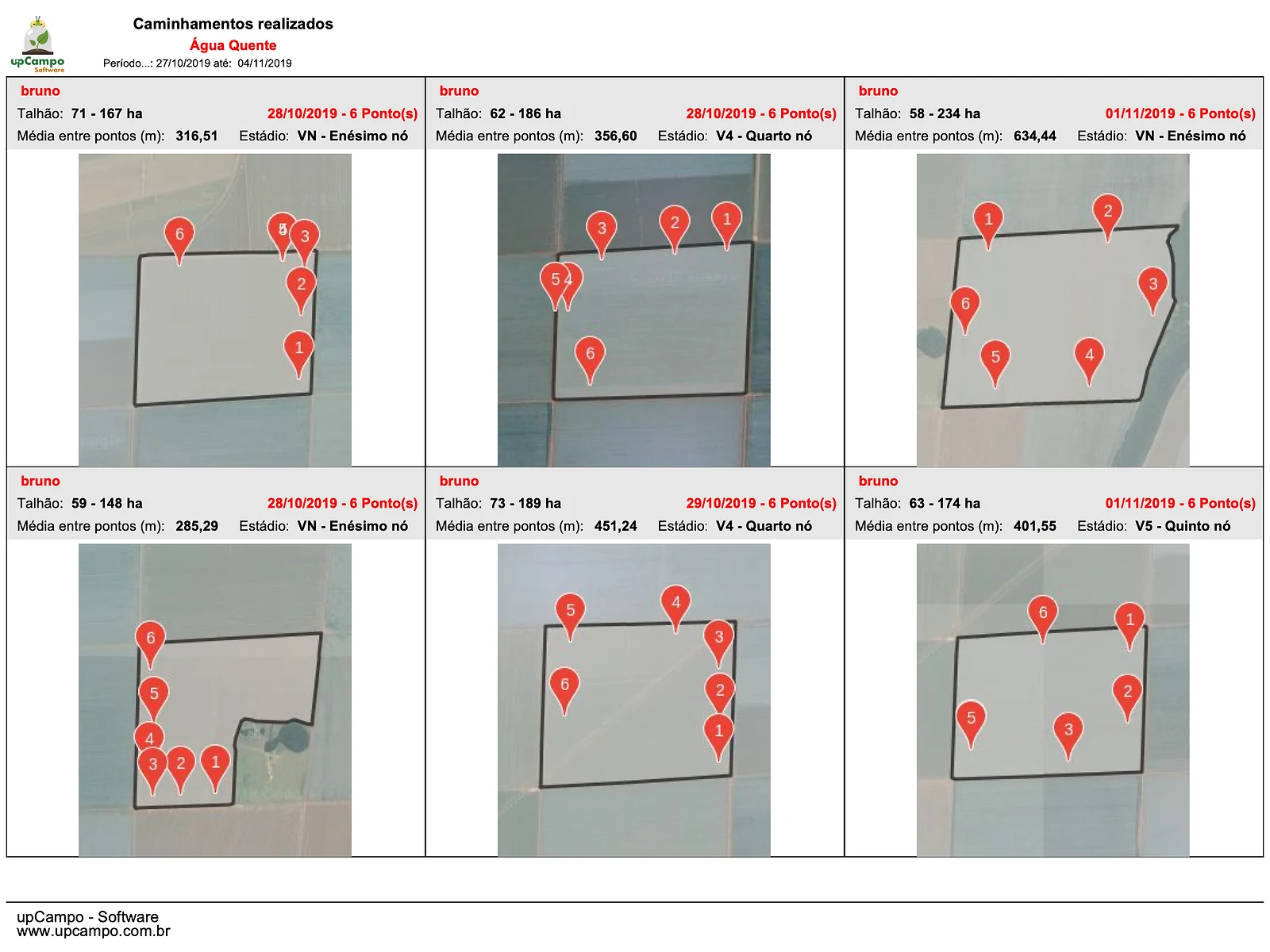
Scout route
Where the scout walked in each field and the average distance between points.
One team, one view
One standard for the whole team.
From the newest scout to the most experienced, the same criteria in every field.
How each pest is calculated, in the Help Center →Everyone sees the same data
The app syncs scouting reports across the whole farm: what one scout logs, the agronomist, the manager, and the other scouts see, with no spreadsheets or photos of notebooks.
The system calculates the field
IPM standard, average per point, percentage of plants, or a formula by instar: the calculation each pest calls for, using every scout's points for the day.
Your farm sets the criteria
The action threshold comes from the technical recommendation your farm follows, by crop and growth stage. upCampo doesn't decide for you.
The agronomist decides the same day
The dashboard shows what crossed the limit. With up.Operações, the application becomes a work order, with inventory and cost per field.
Beyond the count
Traps, phenology, and weather in one place.
Traps
Every trap has GPS and a QR code: the scout walks to it, scans the tag, and logs the collection, even offline. Electronic traps can connect too, if the device allows it.
Phenology and assessments
Height, nodes, and stand; in cotton, squares, bolls, and open bolls. The right growth stage decides which action threshold range applies.
Rainfall and weather stations
Rain gauges and weather stations linked to the fields they cover, right next to the scouting data.
Team in the field
How many points each scout took, in which field, and when. You track the work, not just the insect.
UPí on WhatsApp
Ask UPí how scouting is going.
On the full platform, UPí answers on WhatsApp using the farm's scouting data: the manager or owner knows what crossed the limit without opening the portal.
Meet UPí UPí — upCampo's AIonline
hows scouting in the north sector?
06:42🌱 Soybeans — North Sector
06:42
Scouting from 06/17 and 06/18🐛 Fall armyworm
06:42
• 3A: small in 67% of points
• 7A: large in 50% of points
• 10A: medium in 67% of points
🍂 Target spot
• 10A: 33% severity
• 7A: present in 50% of points
📋 Based on: 10 pointsand weeds?
06:43🌿 Pigweed
06:43
• 7A: in 75% of points
• 3A: in 67% of points
🌾 Goosegrass
• 7A: in 50% of points
• 12A: in 33% of points
Case studies
They started with scouting.
Grupo C. · Lucas do Rio Verde (MT, Brazil)
Found us through the app store, started with IPM, and now have 17,000 field scouting reports.
Grupo A. · Formosa (GO, Brazil)
Started with scouting on 8,000 hectares of soybeans and dry beans, then moved on to work orders.
Fazenda C. · Sapezal (MT, Brazil)
The crop manager started scouting on his own; today the farm runs inventory, purchasing, and fleet on upCampo.
Getting started
From request to first scouting report.
1 free month
On the whole farm, with no contract to sign. Request it through the form; the month starts at onboarding.
Set up with us
Fields, pests, and action thresholds set up remotely with the upCampo team. Usually within 1 week.
Head to the field
In the app store, search for Pragueiro upCampo. The scout logs in with the farm's user, opens the app once with a signal, and can scout offline from then on.
Keep reading
From scouting to the whole operation.
How to do pest scouting (IPM)
Step by step: the scouting, the action threshold, and reading the dashboard.
How much farm management software costs
The price most of the market doesn't publish, with the return math.
up.Operações
From recommendation to work order, with inventory and cost per field.
Cotton
From IPM to the last bale, on the same platform.
up.Monitora FAQ
I have no internet or cell signal on my farm. Can I still use up.Monitora?
Yes. After the first login with internet, the app works with no signal. When the phone is back in range, the records sync with the server and reach the other users on the farm.
Do I lose what I logged if the battery dies or the phone shuts off?
No. Each record is saved on the phone as soon as you log it and goes to the server when there's a signal. What erases data that hasn't synced yet is uninstalling the app, clearing its data, or switching phones before syncing: before doing any of these, open the app with internet and wait for the sync to finish.
How is the field result calculated?
Each pest has its own calculation method, set up by the farm. With the IPM standard, the result is the average per point for beat sheet and square meter counts, the value per linear meter for per-meter counts, and the percentage for per-plant counts. There are also average occurrences, simple sums, per-leaf or per-fruit calculations, and formulas by instar. All points in a field on the same day go into the same calculation, including those from different scouts. Details on each method are in the Help Center.
Does up.Monitora show where the pest is concentrated in the field?
Yes. In each pest's history, the map shows the collected points with each one's value and colors the field by the action threshold ranges. That reveals hot spots the field average would hide.
Can I set custom action thresholds in up.Monitora?
Yes. upCampo doesn't set the action threshold for you: the farm enters the ranges for each pest by crop, count type, size (instar), and growth stage, based on the technical recommendation it follows — research, co-op, or consultancy. The system applies the same criteria in every field and sends an email alert when a count crosses the limit.
Does up.Monitora manage traps?
Yes. Each trap is registered by season, with its field, coordinates, and QR code. The scout logs the collection in the app, with GPS and no signal needed, and capture trends show up in reports and dashboards. Electronic traps can also be added, as long as the device can connect to the platform. The step-by-step guide is in the Help Center.
Can I be notified about the scouting my team has done?
Yes. When a count crosses the action threshold, an email alert goes out. The scouting report is sent automatically, daily or weekly, to the agronomist, manager, consultant, owner, and other roles. On the full platform, you can also ask UPí on WhatsApp how scouting is going.
What reports does up.Monitora generate?
A daily report with the count at each point and a map of the points; a daily summary with every pest by field, color-coded by action threshold; a report of only what crossed the limit, with history and a map by size; a heat map; pest trends with work orders; the scout's route; and scouting statistics by scout. Everything in each report can be changed — layout, colors, logo, and content — and a new format can be built for your farm.
I have more than one scout. Can we all use upCampo on the same farm?
Yes. You can create more users on the same farm. There's a single farm, and the data each scout enters is shared automatically with every user on that farm.
I'm a consultant working with several farms. Do I need a separate login for each?
No. The same user can be linked to several farms, and each farm decides what that user sees and can do. The farm is the one that subscribes, and consultant access is free, since users are unlimited. If the farm wants, it can require a reason for each access. Contract terms are on the pricing page.
Does the up.Monitora app detect pests, diseases, or weeds automatically?
No. The app focuses on logging what was found. You can attach a photo for documentation, but we don't automatically identify the pest.
Does upCampo work with satellite imagery or NDVI?
No. upCampo doesn't work with satellite imagery or NDVI. up.Monitora records what the scout finds on the ground, point by point: pests, diseases, weeds, and phenology, with a photo when needed. If your farm already uses an imagery tool, the two work side by side: the imagery shows where to look, and upCampo records what was found and what was done.
Does upCampo record rainfall and weather station data?
Yes. The farm registers manual rain gauges and Davis and Agrosystem weather stations, indicating which fields each one covers. Integrated stations bring in rainfall and, depending on the model, temperature, humidity, and wind speed. Recorded rainfall can also be checked with UPí on WhatsApp.
What is Integrated Pest Management (IPM)?
It's a management strategy that uses crop scouting and technical criteria to decide when and how to act against pests, diseases, and weeds. In Brazil, Embrapa adapted and promoted Soybean IPM starting in the 1970s. Its foundation is the action threshold: the pest density at which you should act so it doesn't reach the economic injury level, where the damage equals the cost of control. The goal is to spray only when it pays off. In Paraná, soybean growers supported by Embrapa Soja and IDR-Paraná cut their insecticide applications in half by following IPM. The step-by-step scouting guide is in how to do pest scouting.
Is up.Monitora meant for small-scale farming?
No. The solution is focused on large-scale agriculture, especially grain crops such as soybeans, corn, dry beans, and wheat, as well as cotton. The IPM concept can be applied to any crop, and the solution may eventually be used for others, but that depends on testing and user feedback.
1 free month
Scout the whole farm for a free month.
One free month on the whole farm, with no contract to sign. The month starts at onboarding. Leave your name, WhatsApp, email and farm size: we'll reach out to set up the farm with you.