
Farm management software: what does it need to track on a farm?
Learn what farm management software should track and how to connect crops, inventory, machinery, field operations, costs, and production.
 Jonas Rotilli
CEO and founder of upCampo
Farm management software is a platform used to record, connect, and analyze the processes of a farm, bringing together information such as crops, activities, input inventory, machinery, crews, scouting, production, and costs.
Its role shouldn’t be just replacing paper and spreadsheets with screens.
The main gain comes when information recorded during an operation can be used in the next stages of management.
A field application, for example, can record the hectares covered, identify the machines used, move the inputs consumed out of inventory, and help build the cost of the fields treated.
That connection is what turns records into management.
What does farm management software need to track?
Needs vary from farm to farm.
A soybean and corn farm, a cotton operation, a seed research and production unit, and a group with several units can have very different processes.
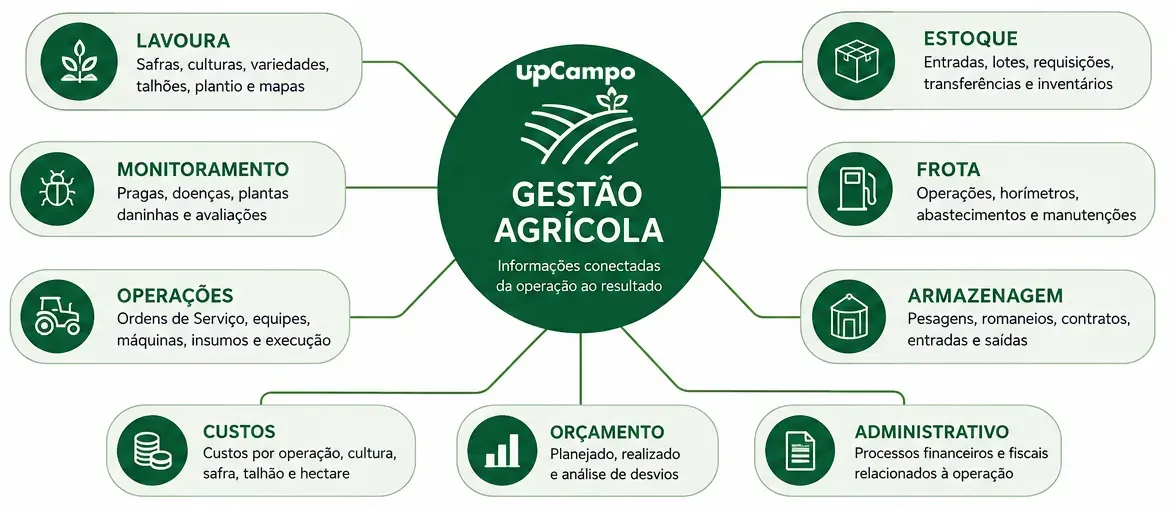
Even so, some areas come up often in integrated farm management:
| Area | What can be tracked |
|---|---|
| Structure | Companies, farms, branches, users, and permissions |
| Crops | Seasons, crops, varieties, fields, planting, and maps |
| Scouting | Pests, diseases, weeds, and assessments |
| Operations | Work orders, crews, machinery, inputs, and execution |
| Inventory | Receipts, lots, requisitions, transfers, and stock counts |
| Fleet | Operations, hour meters, fueling, and maintenance |
| Storage | Weighing, load tickets, contracts, receipts, and shipments |
| Costs | Costs by operation, crop, season, field, and hectare |
| Budget | Planned, actual, and variance analysis |
| Administration | Financial and tax processes related to operations |
That doesn’t mean every farm needs to use all of these areas on the same platform.
The most important question is:
Can the information that makes up my operation stay connected?
From planning to cost: where integration shows up
Imagine a farm that needs to apply fungicide on three fields, totaling 620 hectares.
The plan defines the fields, the products and rates, two sprayers, the crew, and the planned area.
That’s the intent.
Then comes execution.
Because of rain, only 400 hectares are covered that day.
Now there are two different pieces of information:
- Planned: 620 ha
- Executed: 400 ha
The system needs to preserve that difference.
An agricultural work order can help keep the link between what was planned and what actually happened in the field.
But the activity also uses inputs.
Suppose 500 liters of a given product are needed and only 350 liters are available.
Now there’s a need: 150 liters are missing to complete the operation.
That need can move on to a requisition, a quote, and a purchase.
After execution, the products actually used can be linked to the activity and to the fields.
This chain is exactly what matters: planning → need → inventory → purchase → execution → cost
When each step lives in a separate spreadsheet or system, rebuilding that story later becomes much harder.
Inventory is more than a balance
Knowing there are 1,850 liters of an herbicide in the warehouse is balance control.
Management gains depth when you can also answer:
- Where did it come from?
- What did it cost?
- How much was requisitioned?
- Which activities was it used in?
- Which fields received the product?
Agricultural input inventory control becomes valuable when each movement stays linked to what happened in the operation.
The same principle applies to other processes.
A withdrawal of 180 liters of diesel tells you about a movement.
But 180 liters → Tractor 07 → operator → hour meter → date gives you operational context.
The more information has to be connected by hand later, the more effort it usually takes to turn records into management.
Machinery needs to be tied to operations
Tractors, sprayers, combines, trucks, and other equipment shouldn’t exist in the system only as assets.
They work.
That’s why fleet management can connect operations performed, hectares worked, hour meters, operators, fueling, maintenance, parts, services, and costs.
Imagine two similar tractors working during the season.
One of them shows significantly higher fuel use than the other for comparable work.
The system doesn’t need to conclude on its own that there’s a problem.
Its role is to organize the information so that whatever deserves attention can be spotted by management.
That history is part of agricultural machinery and fleet control.
Cost per hectare starts before the report
The math behind cost per hectare is simple.
If a 400-hectare operation cost R$ 80,000:
R$ 80,000 ÷ 400 ha = R$ 200/ha
The hard part isn’t the division.
It’s getting the R$ 80,000 right.
- Which products were actually used?
- What area was actually covered?
- What other resources should be part of that cost?
That’s why cost per hectare doesn’t start in the cost report.
It starts with the quality of the records that feed the calculation.
When activities, inventory, machinery, and areas are connected, cost allocation can reflect what really happened in the operation.
Management also covers what happens in the crop
Not all important information is financial.
Pest, disease, and weed scouting is also part of the production history.
Imagine two fields where the same pest was found.
In the first, the latest scouting reports show a steadily growing population.
In the second, the infestation stays below the action threshold set by the agronomy team.
Recording only “pest found” throws away the most important information.
The scouting history lets you follow how the situation evolves.
The software organizes the data. The agronomic decision still belongs to the agronomy team.
Management can continue after harvest
Depending on the farm’s structure, management doesn’t end when the crop leaves the field.
In an operation with its own storage, the flow can include:
harvest → weighing → load ticket → quality analysis → discount → inventory → contract → shipment
In cotton, the flow can continue through ginning and the traceability of the bales produced.
That’s why a good system shouldn’t be judged only by the number of features it offers.
It needs to reflect the production chain that actually exists on that farm.
Are an ERP and farm management software the same thing?
Not necessarily.
They overlap, but their focus usually differs.
| ERP | Farm operations management | |
|---|---|---|
| Main focus | Administration, finance, tax, and accounting | Farm operations |
| Common unit of analysis | Company, branch, cost center | Season, field, activity, work order |
| Where many records originate | Office | Field |
| Typical question | How much did we buy or spend? | Where and how was the resource used? |
An ERP can record that the farm bought 400 tons of fertilizer.
Operations management needs to go further, to questions like:
- Which fields received it?
- At what rate?
- In which operation?
- How much was actually used?
- What was the cost per hectare?
Some ERPs also track operational information, and some farm platforms include administrative processes.
So one technology doesn’t necessarily have to replace the other.
What matters is understanding where each piece of information originates and how it reaches the people who need to make decisions.
What farm management software doesn’t do
Software doesn’t replace farm management.
Nor does it replace agronomic decisions, the experience of your crews, or, necessarily, other specialized systems.
Telematics, precision agriculture, accounting, weather stations, and other technologies can keep their specific roles.
A management platform can integrate some of that information and put it in the context of the operation.
There’s one especially important limit:
The system organizes the record. It doesn’t replace the decision to record.
A platform can reduce work, integrate processes, and avoid duplicate data entry.
But information that is never collected can’t be turned into management.
What farm size does this make sense for?
The yardstick isn’t just hectares.
Operational complexity can matter more than area.
The need tends to grow when there are:
- several crews working at the same time;
- different farms or branches;
- a high volume of input movements;
- many machines;
- operations that require traceability;
- managers or partners who don’t follow the whole operation in person;
- a need to track costs by area.
A smaller farm can have a complex operation.
A larger farm can have relatively simple processes.
That’s why a better question than “how many hectares does the farm have?” is:
How much information needs to be connected for management to understand what’s happening?
How to evaluate farm management software before you buy
Instead of starting with the number of screens and features, pick a real process from your farm.
For example:
I plan an application → define fields, products, machinery, and crew → check inventory → identify what needs to be purchased → execute → record what was done → update the resources used → allocate the costs.
Then ask the vendor:
Can the system represent this flow without my team having to rebuild or re-enter the same information?
It’s also worth checking:
- Does it work offline where the records are made?
- Does it separate planned from actual?
- Does it keep the origin of inventory movements?
- Does it link machinery to operations?
- Can you drill down from a cost to the records behind it?
- Does it integrate with the other technologies the farm uses?
- Is it simple for the people who will actually record the information?
These questions usually reveal more than a long feature list.
How upCampo puts this concept to work
upCampo was born from a real problem in farm operations and evolved from a pest scouting tool into a farm operations management platform.
Today, up.360 brings different areas of the farm together on an integrated platform, connecting scouting, activities, machinery, inventory, costs, post-harvest, and administrative processes.
A work order, for example, can be linked to the fields worked, the inputs used, the machinery, and the costs generated.
The goal is to keep the trail between what was planned, what actually happened, and the results the operation produced.
UPí, upCampo’s artificial intelligence, runs on this same data. It lets you look up farm information and record operations over WhatsApp, in plain language. UPí doesn’t create new information: it answers based on what has already been recorded on the platform.
If you want to see how these processes work in practice, upCampo’s documentation is public and shows the screens and workflows used on the platform.
If you want to evaluate the platform for a specific operation, our plans and terms are published, and you can talk directly with our team about your farm.
Frequently asked questions
What is farm management software?
It’s a platform used to record, connect, and analyze a farm’s processes, such as crops, activities, inventory, machinery, scouting, production, and costs.
What should farm management software track?
It depends on the farm. The most common processes include seasons and fields, work orders, inventory, purchasing, machinery, fueling, maintenance, scouting, storage, budgeting, and costs.
What’s the difference between an ERP and farm management software?
An ERP usually focuses heavily on administration, finance, tax, and accounting. A farm operations management platform focuses on the processes tied to production and to what happens in the field. The two can work together through integration.
Does farm software work without internet?
It depends on the platform. When records are made directly in the field, offline operation with later sync can be an important requirement. In upCampo, activities can be recorded right in the field, even without internet, and synced later.
Is it possible to calculate cost per hectare?
Yes, as long as the data needed to link costs to the corresponding areas and operations exists. How reliable the result is depends on the records that feed the calculation.
How do you choose farm management software?
Test a complete workflow from your own operation. See how the system connects planning, execution, inventory, machinery, and costs, and whether it keeps the same information from having to be entered several times.