
Agricultural work orders: how to connect operations, inventory and cost
An agricultural work order connects planning, execution, inventory and cost per field. See what it needs to keep linked to become real management.
 Jonas Rotilli
CEO and founder of upCampo
An agricultural work order (WO) is a record used to plan, guide and track a farm activity. It ties together fields, inputs, area, execution and consumption.
In large-scale farming, one trait matters a lot: a single work order often covers several fields.
A ground or aerial spray, for example, can sweep a large part of the farm and cover different fields within the same operation.
That is why the value of a work order is not just in saying what needs to be done. It has to keep the link between what was planned, what was actually done, what was consumed, which fields were covered and what each area cost.
That link is what turns a work order into part of farm management.
If you are still looking at how this information connects across the farm, see also farm management software.
What is an agricultural work order?
A work order can hold everything needed to plan an activity in the field. Depending on the operation, it can include:
- farm and season;
- fields;
- activity;
- planned area;
- products;
- rates;
- scheduled date;
- instructions for the crew.
Take a fungicide application. Before it starts, a few questions need answers: where it will happen, which fields it will cover, how many hectares, which products and at what rates.
The work order organizes that plan. But the plan only shows what should happen — management has to continue during execution.
One work order can cover several fields
Picture a work order created for an application on three fields:
| Field | Planned area |
|---|---|
| Field A | 180 ha |
| Field B | 220 ha |
| Field C | 200 ha |
| Total | 600 ha |
The products are planned to cover all 600 hectares as a single operation.
This is a key trait of large-scale farming. It would make no sense to force a separate operation for each field when the same crew will do the work in one continuous run.
Aerial application makes this even clearer: a crop-dusting plane can make a series of passes over a large stretch of the crop, covering several fields in the same operation.
So the relationship can be one work order for several fields — not necessarily one work order per field.
This difference becomes especially important when we get to product consumption and the cost of each area.
Planned and executed are not the same thing
Say the work order was planned for 600 hectares. On the first day, though, rain stops the job after 400 hectares.
Now there are three numbers: 600 ha planned, 400 ha executed, 200 ha pending.
The plan is still right: the intent was to cover 600 hectares. But the execution record must be right too: at that point, only 400 hectares had actually been worked.
If the system mixes up the two, it may assume products were applied on areas that have not received the operation yet. That affects inventory and, later, cost.
The plan records the intent. Execution records what actually happened.
Work order inputs are tied to inventory
A farm activity usually uses products. If the WO calls for a given application, the required inputs can be checked against the farm’s available inventory.
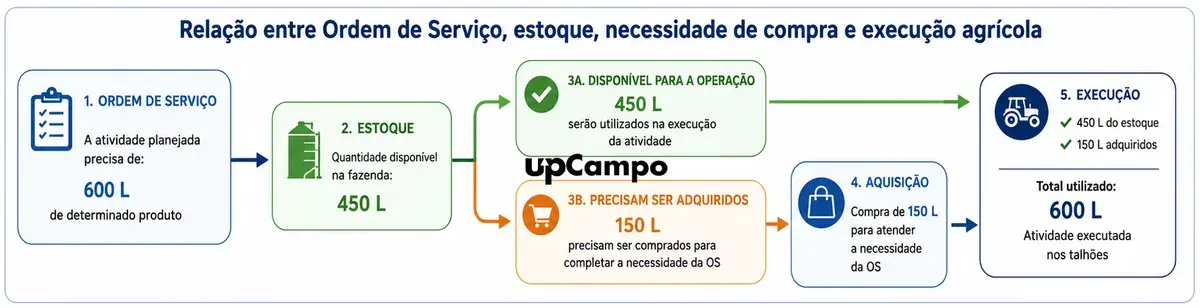
Say the recommendation is 1 liter per hectare. For 600 hectares, that is 600 liters.
If the farm has 600 liters on hand, the operation can go ahead. If it has only 450 liters, the need is 600, the stock is 450 and 150 are missing.
The useful information is no longer just “we have 450 liters in stock.” Now we also know that 150 liters are missing for an activity that is already planned. That gives the purchase a reason.
What if there is not enough product to run the work order?
If the product is not available in the required quantity, a purchase need arises.
What matters is keeping track of where that need came from. The 150 liters are not being bought simply because “stock is low.” They are needed because a planned activity requires them.
This way, management keeps a logical sequence: work order → input need → purchase → execution.
That link matters more than simply creating paperwork between one step and the next. The goal is to know why the purchase was needed and which operation it was meant to serve.
The work order itself can drive inventory consumption
When the available products are actually used in the activity, the work order itself can be the source of the inventory movement.
There is no need for an intermediate requisition just to take out of stock what will be used on the fields. Execution already provides the context for the movement: which activity was done, which products were used, how much was consumed and which fields were covered.
So the product issue is not recorded just as “570 liters left inventory.” It has a source: 570 liters were consumed by this work order, carried out on these fields.
Actual consumption can differ from the plan
Say the WO planned 600 liters for 600 hectares. At the end of the job, however, the recorded consumption was 570 liters — a 30-liter difference.
Those 30 liters should not vanish from inventory just because they were planned. Cost should not automatically count 600 liters either if only 570 were actually used.
Inventory and cost must reflect what actually happened.
But here comes a problem typical of large-scale farming: the 570 liters were used in an operation that covered three fields. How much belongs to each one?
How do you split a work order’s consumption across several fields?
In a continuous operation, knowing exactly how much of each product was used inside each field can be practically impossible.
Aerial application is a clear example. The aircraft does not stop spraying at each field boundary to measure exactly what is left in the tank.
So asking the operator to report how many liters went into each field may mean asking for information that does not exist with that precision in the real operation.
What can be known is the total consumption of the operation and the area actually covered in each field. With those two numbers, the system can do a proportional allocation.
How does allocation by area work?
The operation used 570 liters on 600 hectares, an average of 0.95 L/ha. From there, the system splits consumption in proportion to the area covered:
| Field | Area | Share | Allocated product |
|---|---|---|---|
| Field A | 180 ha | 30.00% | 171 L |
| Field B | 220 ha | 36.67% | 209 L |
| Field C | 200 ha | 33.33% | 190 L |
| Total | 600 ha | 100% | 570 L |
This way, nobody has to try to log by hand a per-field consumption that cannot be measured accurately during the operation.
The crew records the operation. The system does the allocation.
If the work order has several products, the same principle applies to each of them.
From consumption to the real cost of each field
Allocation is not only about splitting quantities. It assigns the cost of the products to the fields that received the operation.
Say the product costs R$ 120 per liter. The total cost consumed in the work order was R$ 68,400. Applying the same allocation:
| Field | Allocated product | Assigned cost |
|---|---|---|
| Field A | 171 L | R$ 20,520 |
| Field B | 209 L | R$ 25,080 |
| Field C | 190 L | R$ 22,800 |
| Total | 570 L | R$ 68,400 |
Now there are two complementary views. By work order, the activity used 570 liters at a cost of R$ 68,400. By field, each area received its proportional share of that consumption and that cost.
This is how data recorded for one operation covering several fields reaches the individual cost of each area.
Why does this matter for cost per field?
A spray is just one of the activities in a season. The same field may get tillage, planting, fertilizer, herbicides, fungicides, insecticides, growth regulators and other operations.
And each activity may cover a different mix of fields. One application may cover A, B and C. Another only A and B. Another B, C, D and E.
That is why simply dividing the farm’s total spend by total hectares does not show how much cost each area actually received.
When every work order assigns its products proportionally to the areas it covered, the history builds up operation by operation:
| Operation | Cost assigned to Field A |
|---|---|
| WO 001 — fungicide application | R$ 20,520 |
| WO 014 — side-dress fertilizer | R$ 31,860 |
| WO 027 — insecticide application | R$ 12,240 |
| Accumulated cost (180 ha) | R$ 64,620 — R$ 359/ha |
This gets you to cost per hectare with much more context about where it came from.
Cost starts in the operation, not in the report
When a manager opens a report and sees “Field A — accumulated cost: R$ X/ha,” that number was not born in the report. The report is just where the information comes together.
The cost started forming long before: planned activity → work order → execution → products actually consumed → allocation across fields → assigned cost → accumulated cost of the area.
That is why calculating farm cost is not just a division. The challenge is keeping track of where the divided values came from.
Traceability lets you explain the cost
Say one field costs more than another. The natural next question is: why?
An integrated system should let you walk the path backward: field cost → cost classes or groups → products used → operations done → work orders → quantities consumed and assigned.
That takes you from “Field A cost R$ X/ha” to “Field A cost R$ X/ha, and these are the operations and products behind that number.”
That difference is what turns cost into management information.
Why is manual allocation not feasible?
Picture an operation with 8 fields and 6 products. That activity alone could require 48 separate quantity entries if someone had to log each product’s consumption for each field by hand.
Now multiply that by dozens or hundreds of work orders over a season.
Beyond the workload, there is a bigger problem: in many operations, the user does not even have the exact number being asked for. They know the total consumption and the fields with their covered areas — not how many liters ended up inside each polygon.
That is exactly where technology should cut work.
The user enters what they can actually measure. The system calculates what can be derived from that data.
How upCampo allocates a work order
In upCampo, a work order can cover several fields, linking the activity plan to its execution and to the products used.
When the operation is carried out, the products consumed can move inventory straight from the WO. There is no need for a requisition just to take out of stock an input used in that activity.
When the same work order covers several fields, upCampo allocates the products and their costs in proportion to the area covered in each field.
This keeps the whole chain: actual WO consumption → inventory movement → allocation across fields → cost assigned to each area. All without asking the operator to enter by hand a quantity that, in continuous operations, would be practically impossible to pin down.
These same numbers can be queried through UPí, upCampo’s artificial intelligence, on WhatsApp. Questions like “how much have we spent on fertilizer this season?” are answered from the work orders and movements already recorded. UPí does not estimate anything: it reads what the operation logged.
Five questions to evaluate an agricultural work order
When you evaluate farm software, do not just check whether it has a screen called “Work Order.” Take a real operation from your farm and ask:
- Can one work order cover several fields?
- Does the system separate what was planned from what was actually done?
- Can the products actually used move inventory straight from the activity?
- When several fields are part of the same operation, can the system allocate consumption across them automatically?
- Can I start from a field’s cost and find which operations and products made up that number?
These questions show whether the work order is just a record or truly part of farm management.
If you want to see how this works in a specific operation, the plans and terms are published and you can talk directly with the team.
Frequently asked questions
What is an agricultural work order?
It is a record used to plan and track a farm activity. It can link fields, products, planned area and information about what was actually done.
Can an agricultural work order include several fields?
Yes. In large-scale farming, one activity can cover several fields. This is especially common when a crew runs an operation continuously over a large area.
How do you track consumption when an application covers several fields?
The operation’s total consumption can be split across the fields in proportion to the area actually covered in each one.
How do you know how much product was used on each field?
In operations where consumption cannot be measured per area, the system calculates each field’s share of the total area covered and uses that share to allocate the products consumed.
How do you calculate a work order’s cost per field?
The products and costs actually recorded in the operation can be split in proportion to the area covered in each field. Each area then receives its share of the activity’s cost.
Can a work order move inventory?
Yes. When products are actually consumed in an activity, the work order itself can be the source of the inventory movement. In upCampo, there is no need for a requisition just to take out of stock the inputs used on the fields.
What happens when there is not enough product to run a WO?
The gap between what the activity needs and what is in stock shows how much still has to be bought. What matters is keeping the link between that purchase need and the operation that created it.
Why separate planning from execution?
Because what was planned may differ from what actually happened. Covered area and product consumption, for example, can change during the activity.
Does the work order help calculate cost per hectare?
Yes. When the operation’s actual consumption is assigned to the fields it covered, those values build up the accumulated cost of each area and, in turn, its cost per hectare.