
Farm accounting, step by step
How accounting works in upCampo.
After finance, the accountant. The invoice, the work order, the harvest and the payment the farm already recorded become debits and credits in the accountant's chart of accounts. The accountant sets it up once and, every month, reviews instead of typing.
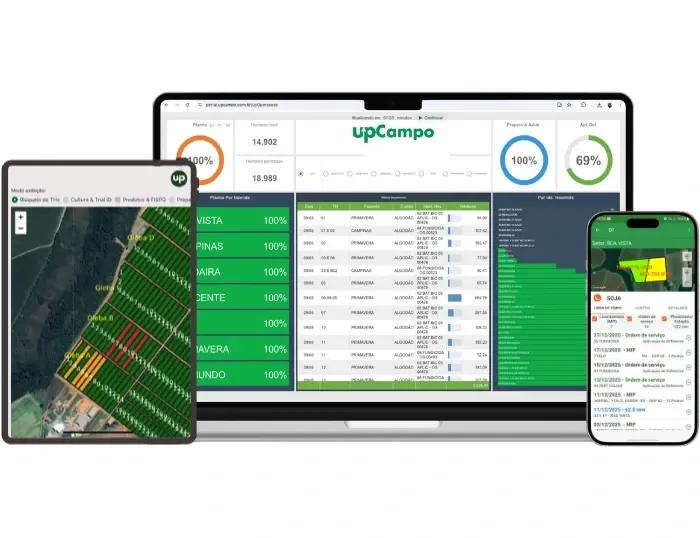
How an entry is made
From event to trial balance, in four steps.
Every accounting entry in upCampo follows the same path. It's the same logic as the posting rules in accounting software, with one difference: the entry comes from the document the farm itself recorded.
The event
What the farm recorded: invoice, work order cost, harvest, fueling, payment, receipt. Whether it came from the portal, the app or UPí.
The rule
For each type of event, the accountant sets once the debit and credit accounts for each part of the amount.
The account
The account on the record (product, supplier, crop) applies; otherwise, the rule's. With neither, the entry stays pending, with the reason.
The month
One button generates the month's entries, with debits equal to credits. The accountant reviews, handles what's pending and posts manually whatever they want.
Step 1 · The accountant sets up
Set up once, with few accounts.
The rule's account is the company default. Records only come in for the exceptions.
Accounting quick guide, in the Help Center (Portuguese) →The accountant's chart
Imported from the spreadsheet their software exports, with the same code for each account. Chart changed? Import again.
Default operations
A wizard asks for the main accounts once (suppliers, customers, banks, inventory, revenue) and creates the operations already filled in.
Exceptions on the records
Those who split crop protection inventory from fertilizer inventory put the account on each product class. Those who don't, leave it.
Depreciating assets
Machinery, equipment and improvements from the fleet, with value, start date and annual rate. A R$ 500,000 tractor with a R$ 50,000 residual at 10% a year depreciates R$ 3,750 a month.
Step 2 · What becomes an entry
The farm's events, posted on their own.
Purchase invoice
By the type of operation: purchase for inventory, for consumption or of fixed assets, with freight, taxes and withheld Senar.
Sales invoice
Revenue from selling the crop and the cost of what left inventory, at the cost the field accumulated.
Work order
The input applied leaves inventory and goes to crops in progress, one entry per work order.
Harvest
The field's cost goes to grain or lint inventory: on the harvest ticket, when the field is finalized or at season close.
Fuel and requisitions
Diesel from the pump and parts out of the storeroom, at average cost.
Payments and receipts
On the date the money moved, with interest, discount and withholding. One-off bills post through the account category.
A fertilizer invoice, start to finish.
The farm finalizes the entry of an invoice for R$ 50,000 of fertilizer and R$ 1,200 of freight. The invoice's operation type is linked to Purchase for inventory, and the Fertilizers class has its own inventory account.
When the month is generated, upCampo posts: debit Fertilizer inventory, R$ 51,200, and credit Suppliers, R$ 51,200. Freight goes into inventory because the purchase operation says so. If the farm takes ICMS credit, the tax comes out of inventory and goes to ICMS recoverable.
Nobody typed the invoice again. And on each line the accountant sees where the account came from: the record or the operation default.
Step 3 · The accountant reviews
Everything missing shows up, with the reason.
The month's work stops being data entry and becomes review.
How accounting entries work (Portuguese) →Generate the month
Generating again redoes what was generated and what was pending, without duplicating. Manual entries are never deleted.
Pending, with the reason written
A missing account, an invoice operation type with no rule, a product sold with no cost. Fix the cause, generate again.
Manual entry, prepared
What the accountant prefers to post by hand, such as the harvest at season close, the system prepares for review and saving.
Indirect costs to the crop
Depreciation, fuel, maintenance and salaries split across seasons by planted area, direct cost or machine hours. The accountant picks the criterion.
On screen
What the accountant sees.
Portal screens with sample data.
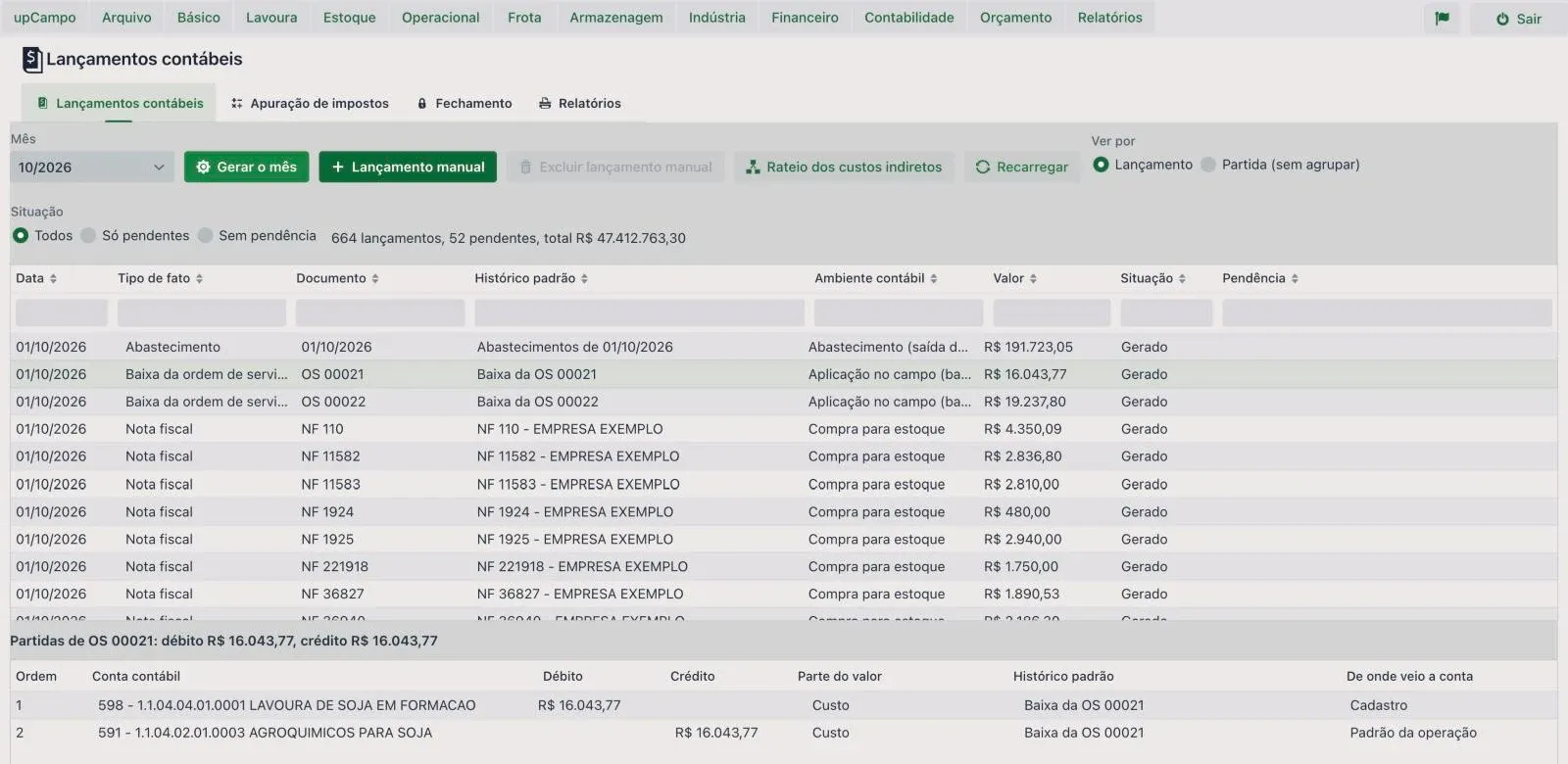
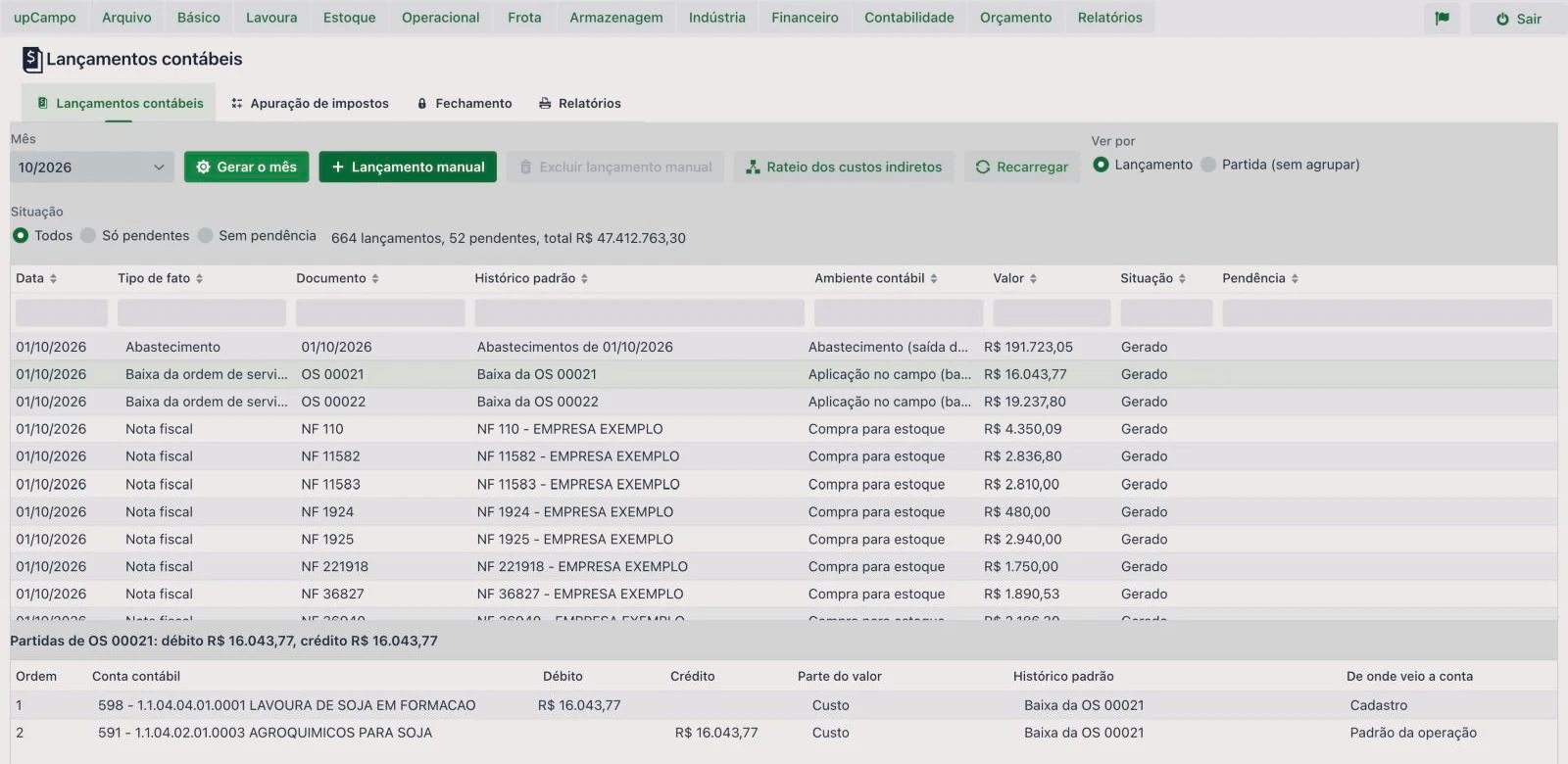
The month's entries
Each event with its amount, status and lines below.
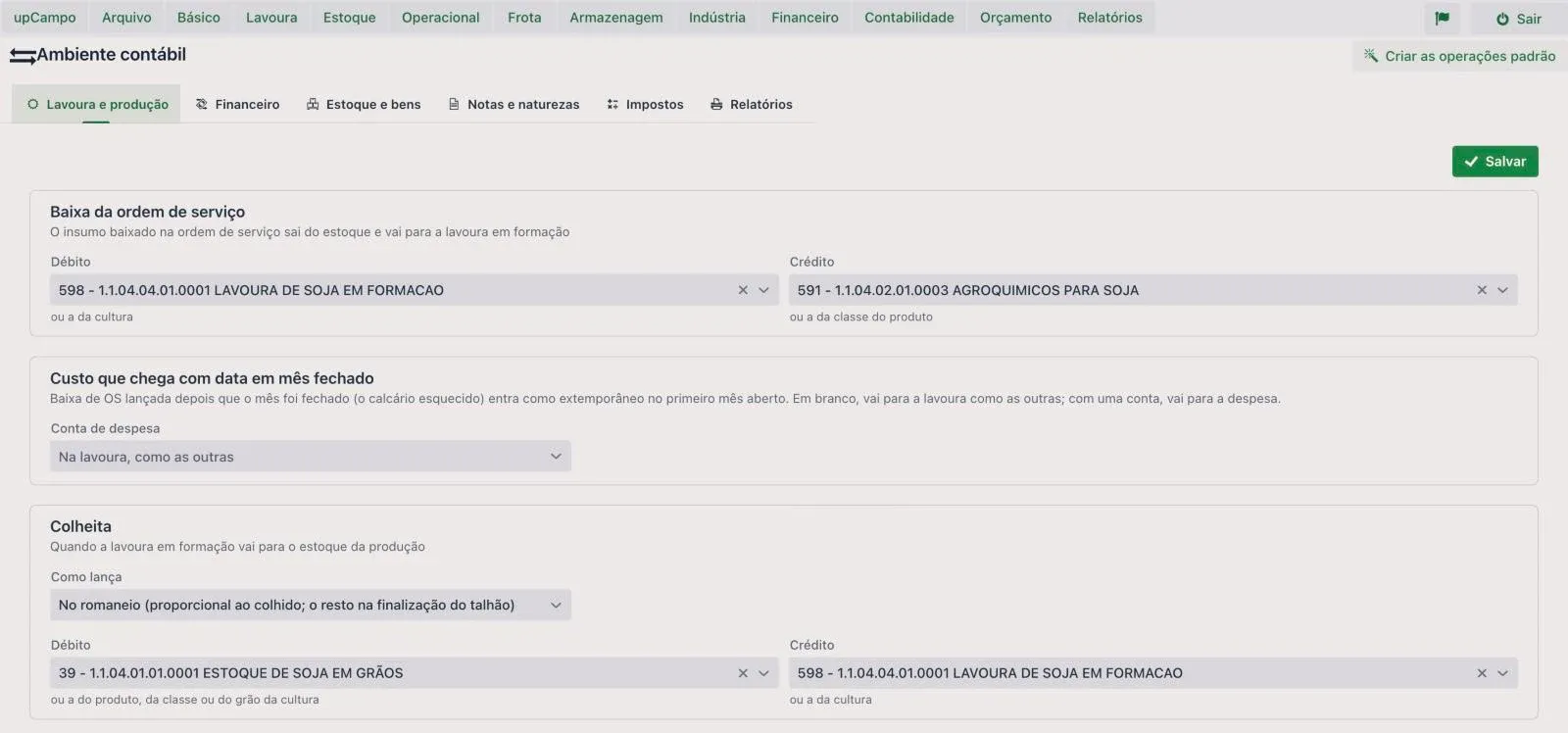
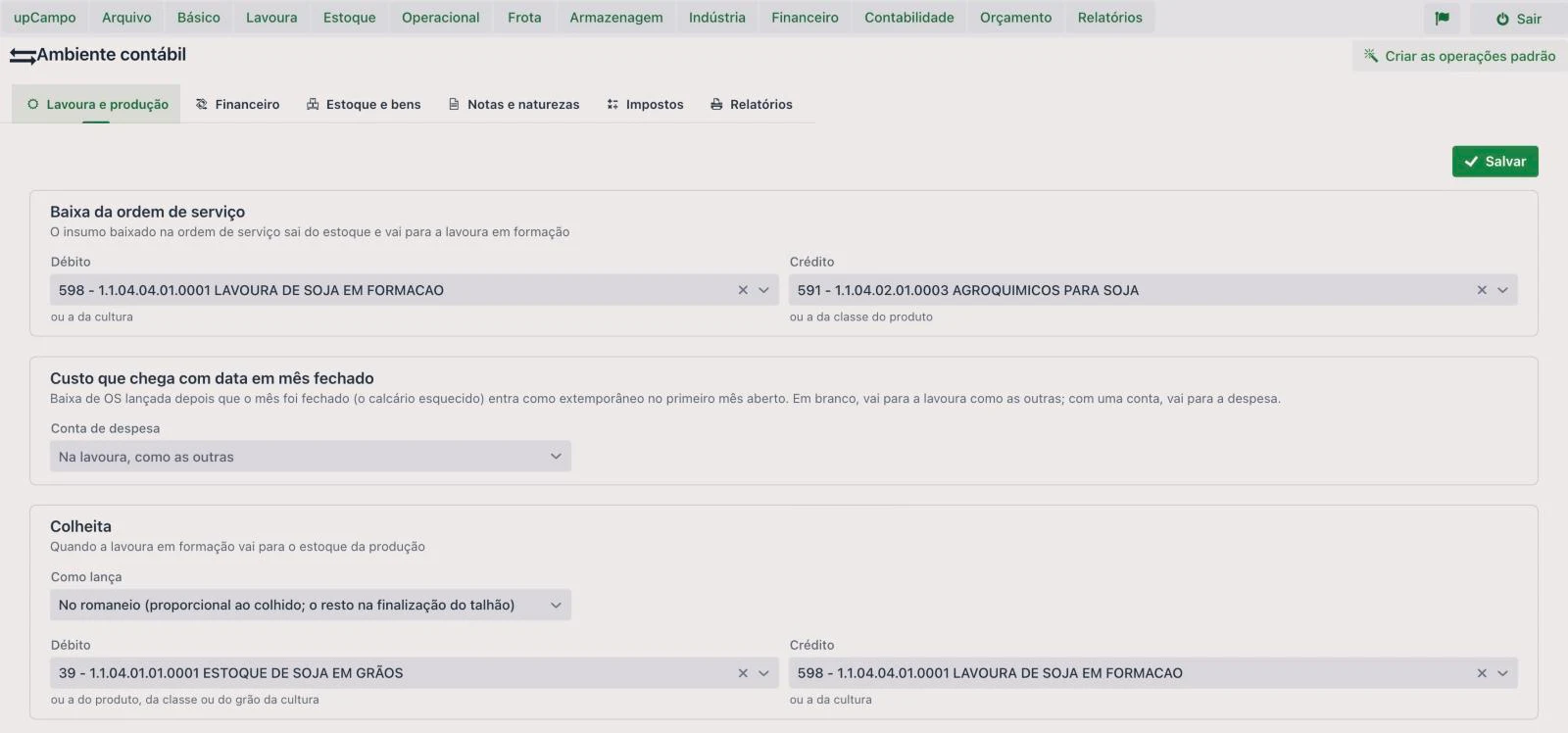
The rule for each event
Work order cost and harvest, with debit and credit accounts.
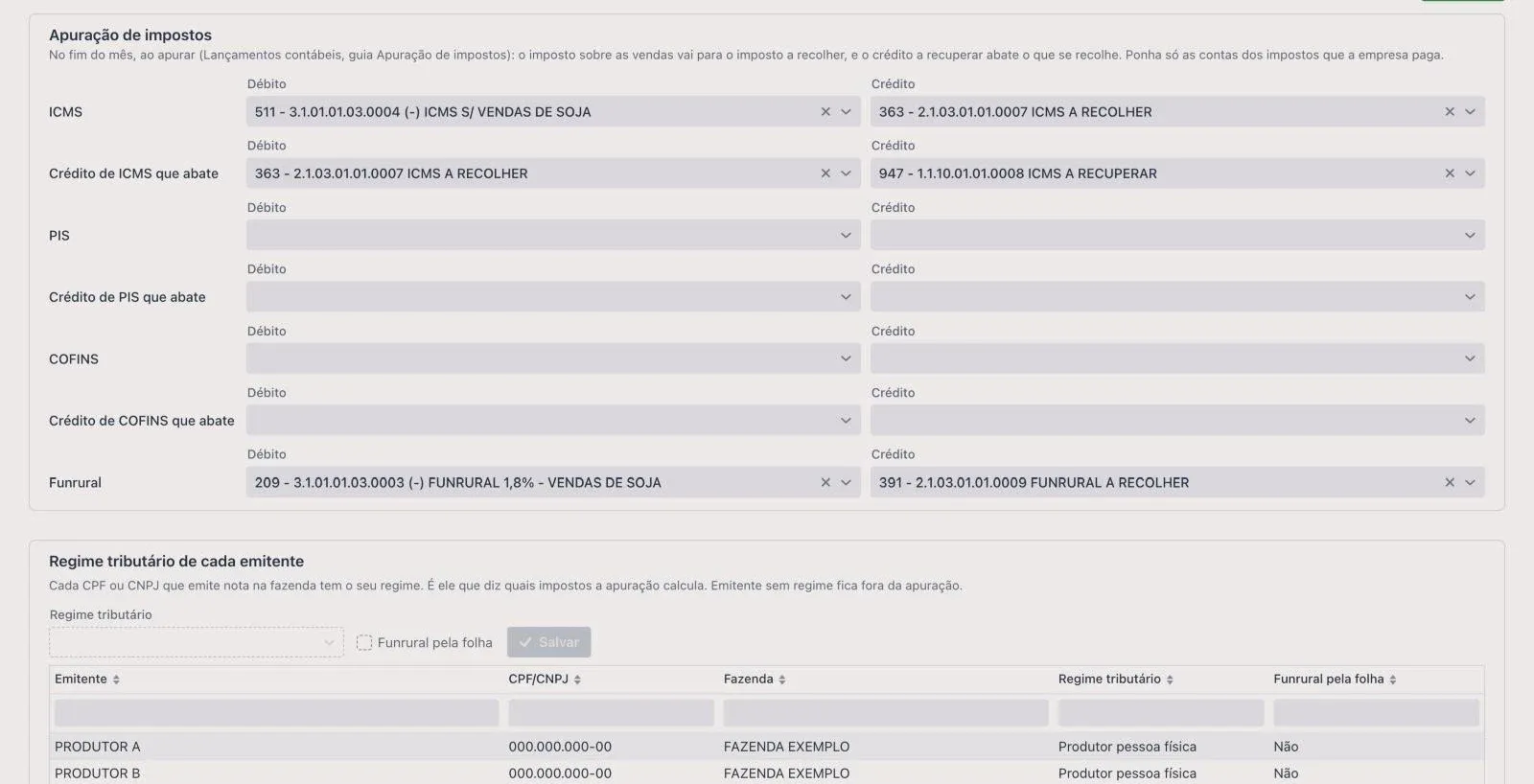
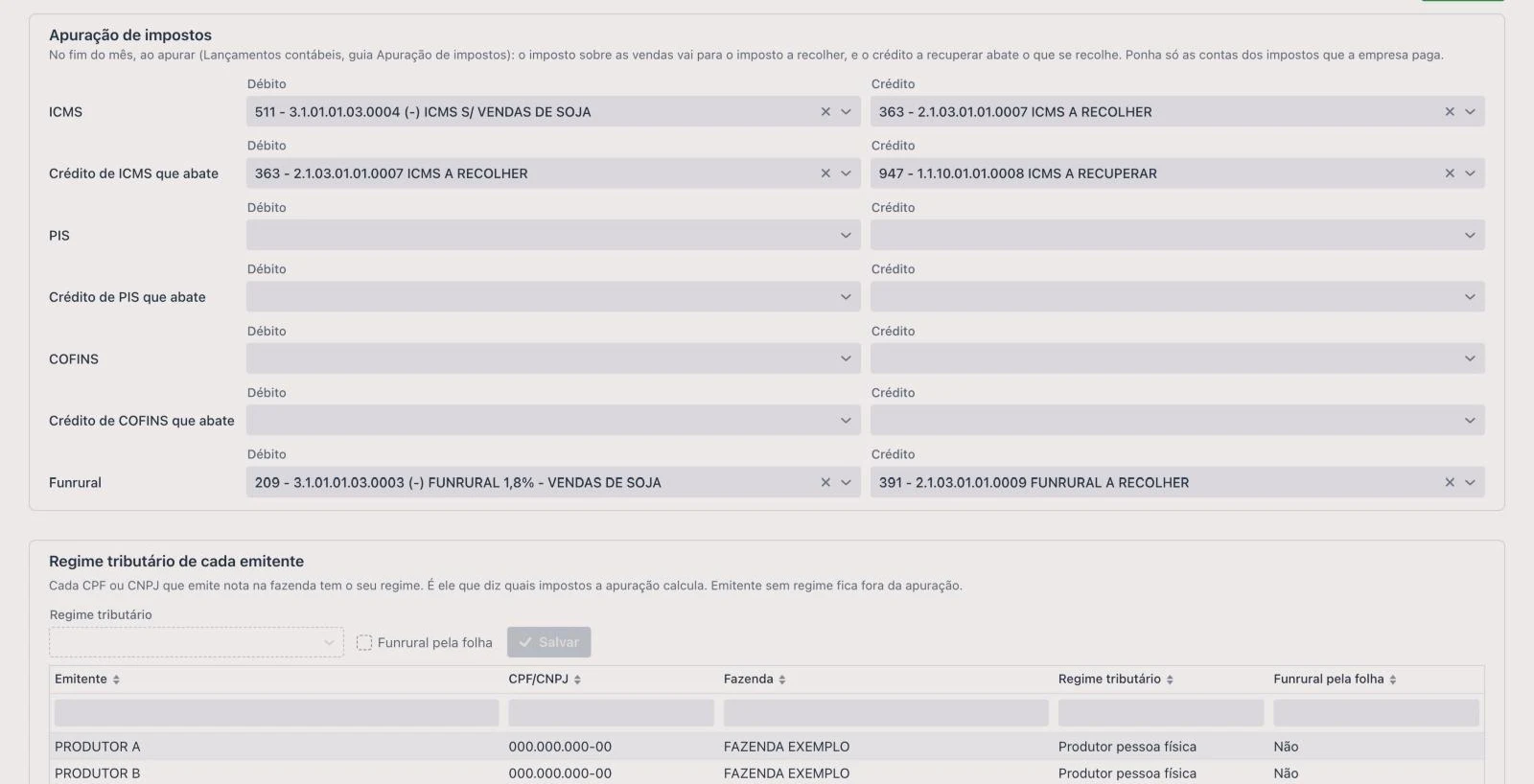
Tax calculation
The accounts for each tax and each issuer's tax regime.
Step 4 · Taxes
Tax calculation comes from the invoices.
At month-end the accountant runs the calculation, and upCampo generates the entry for each tax, by issuer.
Each CPF and CNPJ in its regime
In a group with several farmers and companies, each issuer has its own tax regime, which determines which taxes are calculated.
ICMS, PIS and COFINS
Tax on sales goes to tax payable, and recoverable credit offsets what is paid.
Funrural
At the registered rate, when the farmer is the one who pays it.
Step 5 · The month closes
A delivered month doesn't change.
Only closes what finance closed
Before closing, the screen shows what's blocking: pending entries or a finance period still open.
The forgotten lime
A cost that arrives after the close doesn't reopen the month: it comes in as an out-of-period entry the following month, if the accountant allows it.
Or lock it for good
With the full lock, the portal won't accept invoices, work orders or fueling dated in the closed month, and warns whoever tries.
The books
Journal, ledger and balance sheet on screen.
The accountant reviews and prints the books and statements right in upCampo, by period and by farm.
Journal
One line per entry line, in date order, with document, description, account, debit and credit.
Ledger and trial balance
Each account's activity and balance for the period.
Income statement and balance sheet
The period's result and the position of assets, liabilities and equity.
Pending items
The list of what hasn't become an entry yet, to close the month with no surprises.
The sequence
From the field to the balance sheet, one record.
Operations
Work orders, inventory and harvest, in up.Operações.
Finance
Payables and receivables, approval, reconciliation and close.
Accounting
Entries, taxes and the accountant's books. This page.
LCDPR
For individual farmers, the cash book and the income tax file.
Frequently asked questions about upCampo accounting
How does upCampo accounting work?
Accounting entries come from what the farm already recorded: invoices, work order costs, harvest, fueling, requisitions, payments, receipts and depreciation. The accountant imports their chart of accounts, sets once which account each type of event goes to and, every month, generates the entries, handles what's pending and posts manually whatever they want.
Is accounting part of up.360?
Yes. Accounting comes with up.360, upCampo's full platform, along with finance, the cash book and LCDPR, invoicing and UPí. It isn't sold separately and has no extra cost. Up to 1,000 hectares, the minimum contract is R$ 15,000 per year; prices are on the pricing page.
Do I need to type invoices again for accounting?
No. The entry comes from the invoice, work order cost, payment and receipt already in the system, whether they came from the portal, the app, the API or UPí.
Does it work with my current accountant?
Yes. The chart of accounts is your accountant's, imported from the spreadsheet their software exports, with the same code for each account. They review the journal, ledger, trial balance, income statement and balance sheet right in upCampo.
Can I send the entries to my accountant's software yet?
Not yet. Exporting entries, adjusting and reversing generated entries and opening balances are in development. Today upCampo generates the month's entries, accepts the accountant's manual entries and produces the books and statements.
Why is an entry pending?
Because something was missing to build the debit and credit: an account that neither the record nor the rule has, an invoice whose operation type isn't linked to any rule, or a product sold with no cost. The reason is written next to the entry. Fix the cause and generate the month again.
Do harvest and depreciation go into accounting?
Yes. The harvest moves the cost of crops in progress to production inventory: on the harvest ticket, when the field is finalized or by hand at season close. Depreciation comes from the asset records, with value, start date and annual rate, and is posted every month.
Does upCampo calculate taxes?
Accounting calculates, each month, the ICMS, PIS, COFINS and Funrural of each issuer, under each one's tax regime, and generates the calculation entry. Simples Nacional is left out: the tax is the one on the DAS.
Is accounting per farm or per company?
Per company. The chart of accounts, the rules and the entries belong to the company and gather what all its farms record in the month. Reports can be pulled by farm.
Does an individual farmer need accounting?
They're not required to have it. For income tax, the path is the cash book and the LCDPR, in finance. Those who want full bookkeeping use both, from the same records.
1 free month
Show upCampo to your accountant.
One free month on the whole farm, with no contract to sign. The month starts at onboarding. Leave your name, WhatsApp, email and area: we'll reach out to set up accounting with you and your accountant.